
Links that choose for the shopper
Add choices to the end of a product’s web address, and the page opens with them already picked. Handy in adverts and emails.
https://yourshop.com/product/classic-pullover-hoodie/?colour=black&size=l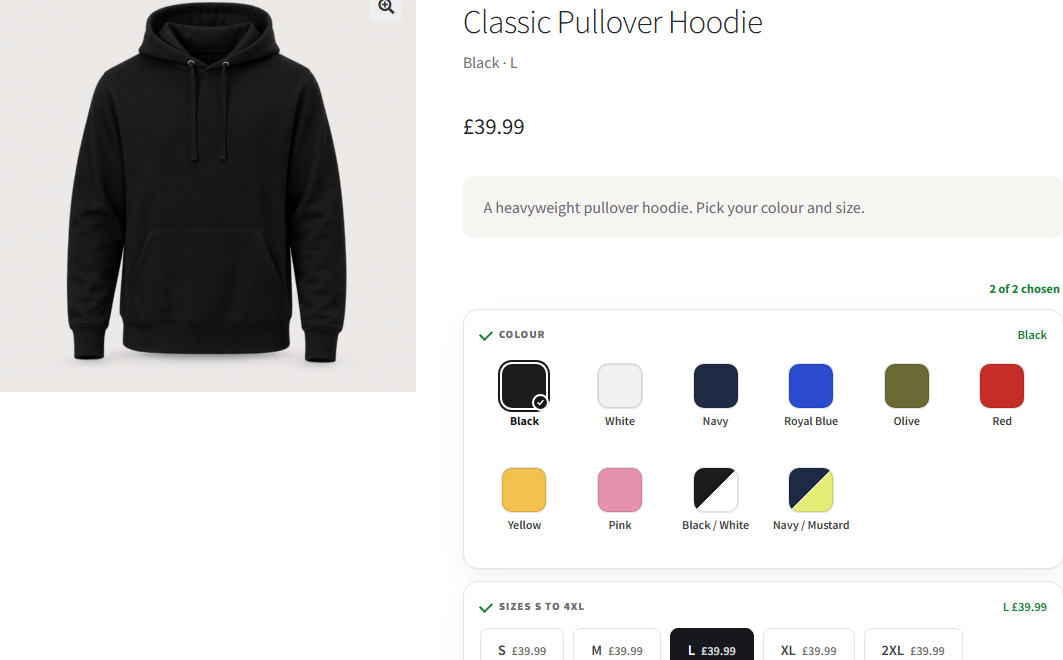
Write a link
Section titled “Write a link”- Copy the product's web address.
- Add
?and the first choice, likecolour=black. - Add any more after
&, like&size=l.
Open it to check. Your choices should already be picked.
Which words to use
Section titled “Which words to use”- Colour:
colourorcolor. Size:size. - Any other question: its name in lower case, with a hyphen for each space. Back print is
back-print, soback-print=nonepicks None. - The choice: its name, the same way. Light Blue is
light-blue. - Capital letters don’t matter.
Good to know
Section titled “Good to know”- A link never picks a sold-out choice or a paid extra.
- A word the product doesn’t have is ignored, and the page opens as normal.
- On a quantity grid, the link opens the colour with 1 in the size.
Page caching
If your caching plugin shows the same page whatever the link says, add colour and size to its list of query strings. In WP Rocket that's Advanced Rules, Cache Query String(s).
AddOnBoss Pro’s Google Shopping feed uses these links for every item.
Was this page helpful?Thanks for the feedback.
We use cookies to see how people use BossMage and which ads bring them here. They are only set if you accept. Privacy
Cookie choices
NecessaryStores your cookie choice on this site.
Always onAnalyticsLets Google Analytics show us how people use the site. Kept for up to 13 months.
AdvertisingLets Google Ads and OpenAI (ads in ChatGPT) tell us which ad brought you here. Kept for up to a year.