
Sell by measured size
Measured sizing is part of AddOnBoss Pro.
A measured size set prices a product by its size. The customer gives you a size, and your rates work out the price. Use it for cut-to-size banners, fabric by the metre, rope or worktops.
Price from a sheet instead of a rate? Use a price table. Selling glass or shutters? Follow glass cut to size and profile shutters.
Create a measured size set
Section titled “Create a measured size set”- In the WordPress menu, go to BossMage, then Option sets.
- Press + New set.
- Under What kind of set?, find the Measured size card and press Start blank. Or press or use a template to start from one, such as Glass by sq ft or Shutters.
- Type the set’s name, such as Banner size. Shoppers see it on the product page and in the cart.
- Fill in Size, Price and Sizes, as below.
- Press Save set.
Say what customers measure
Section titled “Say what customers measure”Under Size, add one row for each measurement.
- Type its Name, such as Width.
- Pick its Unit, such as mm or cm.
- Optional: type the Smallest and Largest size you make.
- Press + Add a measurement for the next one, such as Height.
One measurement prices by length. Two price by area. Three price by volume.
A new set has no smallest size until you type one. Until then, the editor says “Your From price is for a 1 × 1 mm piece until you set a smallest size.” Under each limit, the editor shows it in the unit customers type, such as “100 to 2440 mm”.
With two measurements, Pieces can be turned to fit takes a piece that fits only the other way round, such as 1830 × 2440 mm from a 2440 × 1830 mm sheet. It’s priced and made as typed. Under the boxes, the page says “Min: 100 × 100 mm · Max: 2440 × 1830 mm”. It’s ticked on new sets. A set whose parts follow a list’s sides, such as a shutter, never turns.
A limit typed in the wrong unit is flagged, such as “2440 ft is 744 m.” Press These limits are mm to read them as mm.
The line under the rows says how precise a size can be, such as “Customers can type any whole cm.” Press Change to allow only steps, such as steps of 10.
Price it by parts
Section titled “Price it by parts”Under Price, build the price from parts. Most shops need one part, such as £12.00 per m², and a minimum.
- Type the part’s name, such as Banner. Only you see it.
- Choose how it’s charged, such as per m².
- Type the amount.
- For a set-up charge, press + Add a part, choose per item and type the amount.
- Type a Minimum price. No size costs less than this.
A part can be charged:
- per item, such as set-up.
- per m² or per sq ft, such as the banner itself.
- per metre or foot of edge, such as hemming or eyelets.
- per metre or foot of one measurement, such as per metre of width.
The bar under the parts prices a sample size as you type. It shows each part and what the minimum adds.
A part can also take its rate from another list, such as glass by its thickness. It can round up, add a length to each measurement, or charge only some sides. See price a size by its parts.
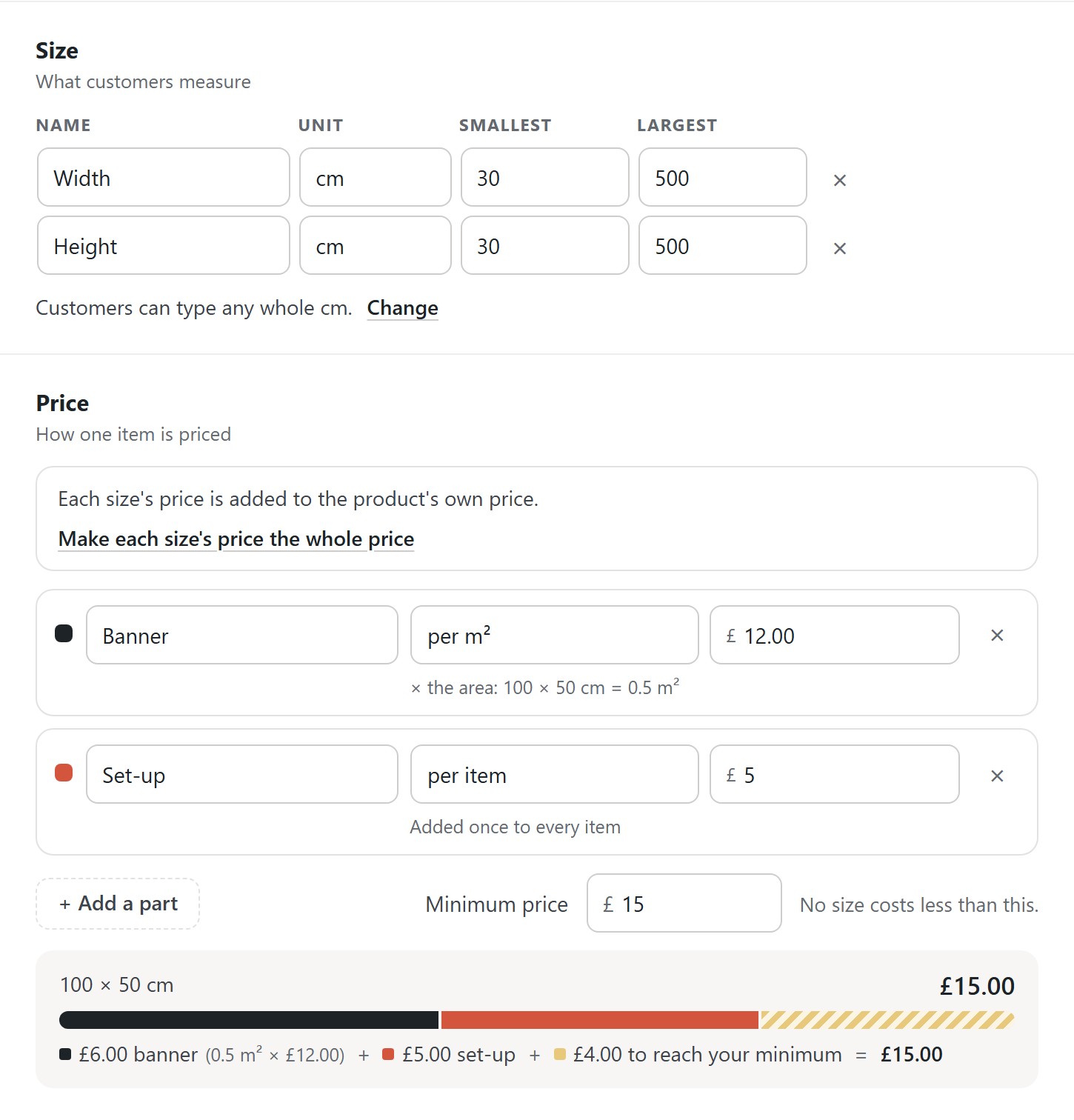
The box at the top of Price says how the size’s price meets the product’s own price:
- “Each size’s price is added to the product’s own price.”
- “The product’s own price covers the smallest size. Bigger sizes pay the difference.”
Press Make each size’s price the whole price to charge the size’s price instead of the product’s own price. Then press Save set.
Sets made before AddOnBoss 2.7.0 keep their prices.
Add ready-made sizes
Section titled “Add ready-made sizes”Under Sizes, add the buttons customers tap, such as A4 or 600 x 400.
- Press + Add a size.
- Type the button text, or leave it empty to show the size.
- Type the size.
Each size is priced from your parts. Type a price in its box to give it its own price instead.
Already charge set prices for some sizes? Press Already charge set prices for some sizes? Work out your rates from them. Type what you charge for two or three sizes. AddOnBoss offers rates that match, or keeps those prices exactly.
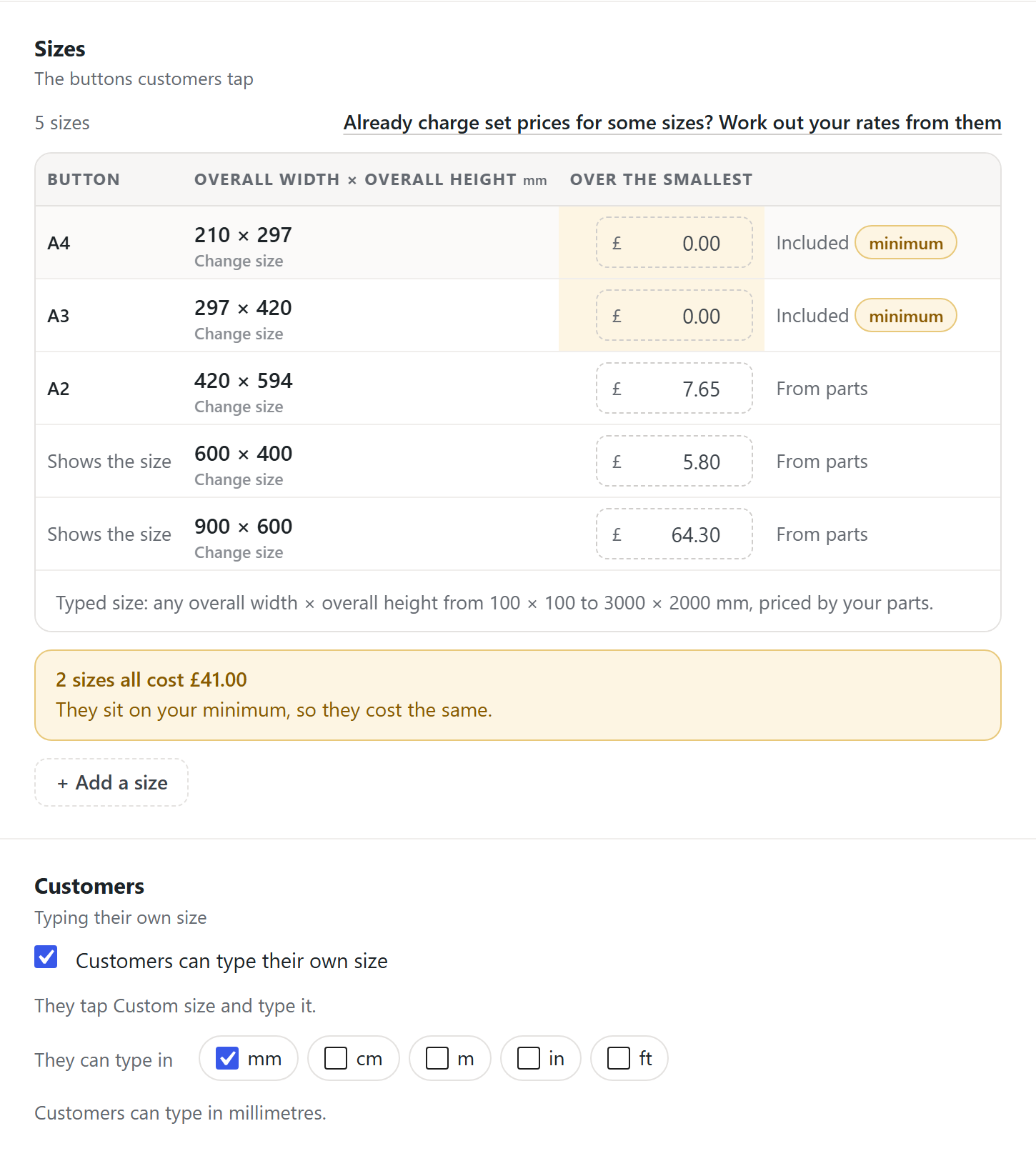
The editor warns you about problems before you save. For example, a size listed twice, or a bigger size that costs less than a smaller one.
Let customers type their own size
Section titled “Let customers type their own size”Under Customers, tick Customers can type their own size. They tap Custom size and type it.
Next to They can type in, tick each unit they can use. With more than one, the product page shows the units as buttons, your own unit first. The price is the same in any unit. The order keeps the size the way the customer typed it, such as “8 × 4 ft”.
Ready-made sizes stay in your unit. Your steps only apply to sizes typed in your own unit.
| You want | Customers can type their own size | Sizes |
|---|---|---|
| Cut to any size | Ticked | None needed |
| A fixed list only | Not ticked | At least one |
| A short list, plus any size | Ticked | As many as you like |
With the box unticked and no sizes, customers have nothing to pick. Saving tells you so.
What customers see
Section titled “What customers see”Your ready-made sizes as buttons, then Custom size. Each size box says what it takes, such as “30 to 500”. The price updates as they type.
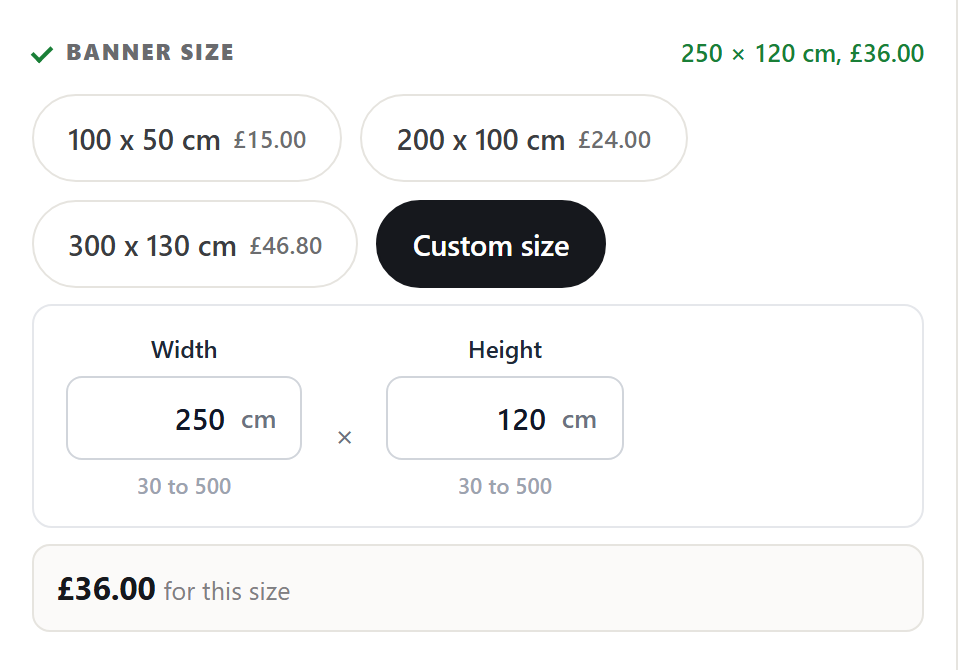
If a typed size is too big, too small or off your steps, the page refuses it and says why. The box keeps what was typed, and Add to cart waits until it’s fixed. For example:
- “Maximum width is 1830 mm.”
- “Width must be a whole number of mm, such as 600 or 601.”
- “Maximum size is 2440 × 1830 mm.”
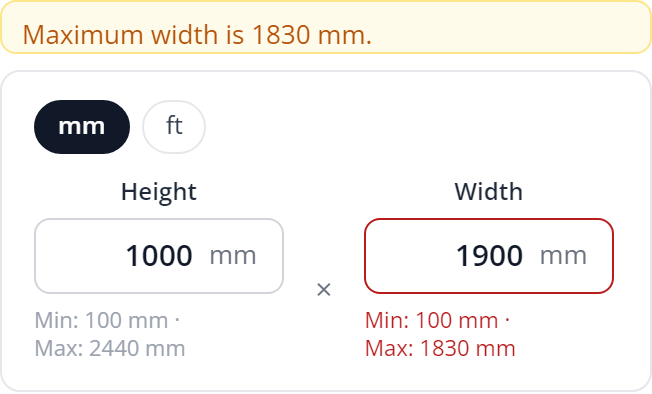
The cart and the order keep the unit, such as “1500 × 1000 mm”.
Show each size at its full price
Section titled “Show each size at its full price”By default a ready-made size shows what it adds, such as +£8.80. A size the base price covers says “included”.
Where the size is the product itself, show full prices instead:
- On the product, under How customers order this, set Prices on choices to Full price on the first list.
- Keep the size set at the top.
Each size then reads what the product costs in it, such as £17.00 or £25.80. Lists below it still show what they add. The charge is the same either way.
Attach it to a product
Section titled “Attach it to a product”Attach a measured size set in the product’s Product Options panel, like any other set.
Need one size box on one product? A field can be a measured size too. The set is the version you reuse.
Good to know
Section titled “Good to know”- The minimum is a floor, not an extra. A size that costs less pays the minimum.
- A product priced only by its size shows “From” the cheapest it can be bought for, on its page and in the shop: the cheapest size with the cheapest choices it needs. It never shows £0.00. A price typed on the General tab isn’t used, and the tab says so.
- Your shop works out every price, not the browser. Prices follow your shop’s tax settings. See pricing and fees.
- Past orders don’t change. What a customer paid is kept on their order.
We use cookies to see how people use BossMage and which ads bring them here. They are only set if you accept. Privacy
Cookie choices