
Glass cut to size and profile shutters
This guide uses measured sizes, which are part of AddOnBoss Pro. Adding 50 mm to each measurement and charging sides by Handle side need AddOnBoss 2.10 or later.
This guide sets up two products from start to finish: glass cut to size, and a made-to-measure profile shutter. Every price below was checked on a test shop.
The examples use pounds and feet. A shop that sells in rupees per sq ft, or euros per m², sets it up the same way. Only the shop’s currency changes.
Make one product for each glass thickness or shutter type, such as Clear Glass 4 mm, Clear Glass 8 mm and 45 mm Shutter. Each product has its own rates and its own way of working out the area.
On the Measured size card, press or use a template and pick Glass by sq ft or Shutters. Each comes with its parts, sizes and lists, and the lists are made when you first save. Type your own rates, then follow the steps below to check each setting.
Glass cut to size
Section titled “Glass cut to size”1. Make the lists
Section titled “1. Make the lists”In the WordPress menu, go to BossMage, then Option sets. Make each list with + New set, as in create a list of choices.
| List | Choices | Price on the choice |
|---|---|---|
| Shape | Rectangle, Round, Oval, Capsule, Corner round, Custom shape | Your price, or none |
| Edge finish | No polish, Edge polish, C polish, Bevelling | None. The rate goes in the size set, step 4. |
| Flutes run along | Height, Width | None. For fluted glass only. |
| Holes | No holes, 1 hole, 2 holes, 3 holes | Your price per choice |
| Cut-outs | No cut-outs, 1 cut-out, 2 cut-outs | Your price per choice |
| Accessories | Your accessories | Your price per choice. Let customers pick several. |
For accessories, see let customers pick more than one.
2. Make the size set
Section titled “2. Make the size set”- Press + New set. Under What kind of set?, press Start blank on the Measured size card.
- Name it Glass size.
- Under Size, add Height and Width, both in mm.
- Type the smallest piece you cut, such as 100, and the sheet size as the largest: 2440 and 1830.
- Leave Pieces can be turned to fit ticked. A 1830 × 2440 mm pane then fits the 2440 × 1830 mm sheet.
- Under Customers, tick Customers can type their own size.
- Next to They can type in, tick mm. Tick ft too if customers measure in feet.
Set up in ft already? Type 2440 anyway. The editor says “2440 ft is 744 m.” Press These limits are mm, and it changes them to feet for you.
Leave the smallest empty, and the editor says “Your From price is for a 1 × 1 mm piece until you set a smallest size.”
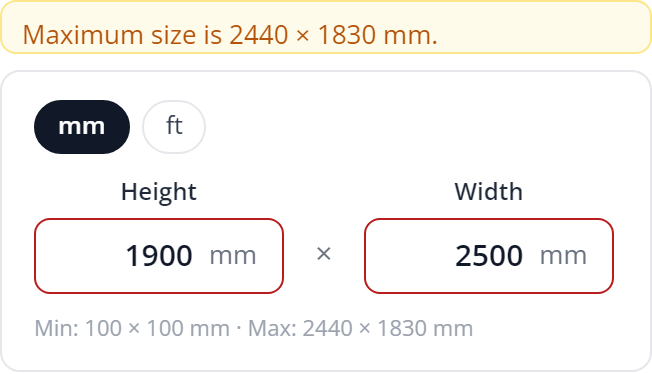
A size too big either way round is refused. The page says “Maximum size is 2440 × 1830 mm.”, and Add to cart waits until it’s fixed. Nothing is resized.
3. Price the glass
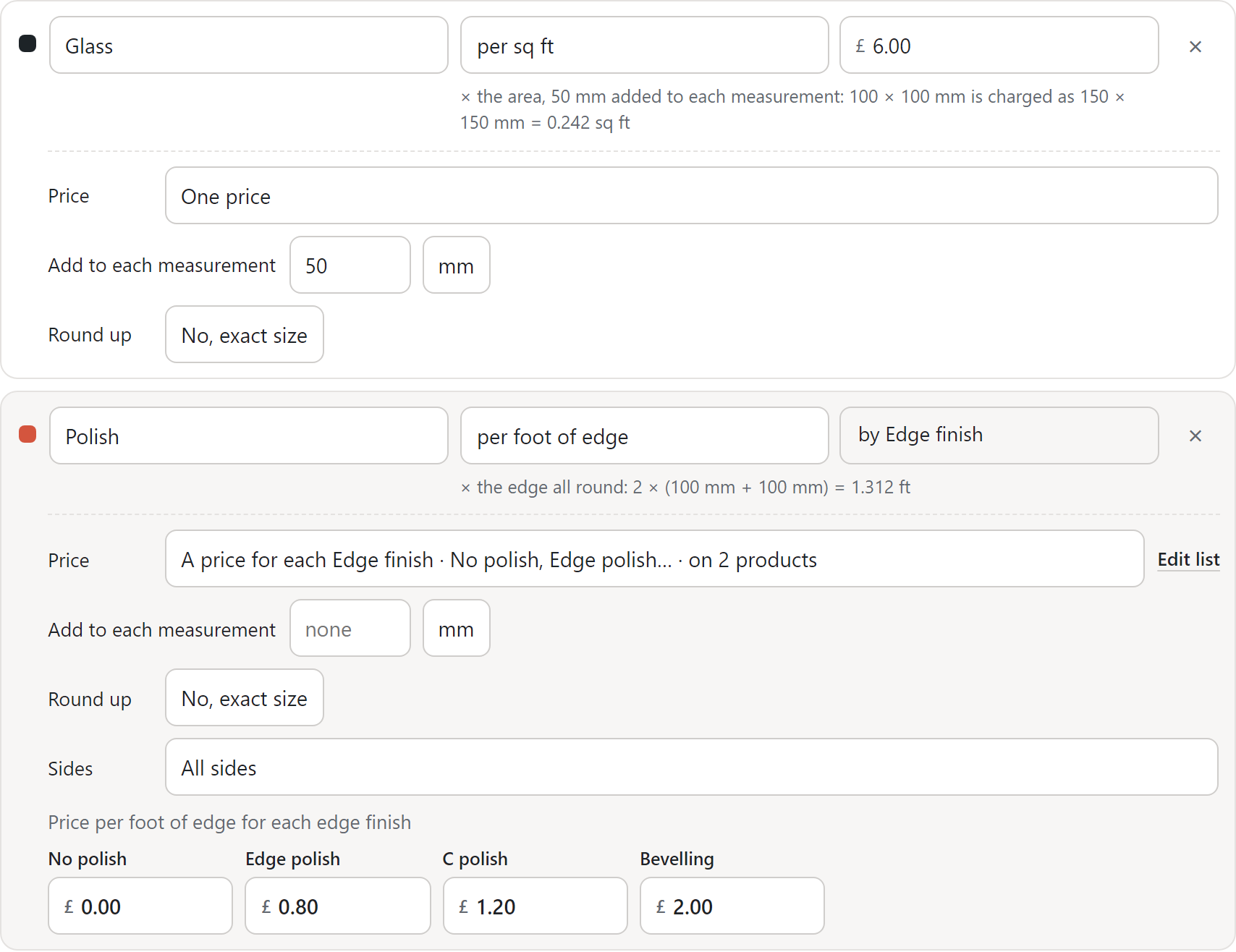
Section titled “3. Price the glass”Under Price, name the first part Glass, choose per sq ft and type your rate, such as £6.00. The menu offers per sq ft even though the set measures in mm. Then pick how the area is worked out:
| Method | Set on the Glass part | 600 × 520 mm is charged on |
|---|---|---|
| Actual size | Nothing more | 3.358 sq ft |
| Round up to the half foot | Round up: 0.5 ft | 2 × 2 ft = 4 sq ft |
| 50 mm added | Add to each measurement: 50 mm | 650 × 570 mm = 3.988 sq ft |
The piece is always made to the size typed. The 50 mm can be any length, in its own unit. See price a size by its parts.
Rounding a size typed in mm uses the trade’s 305 mm foot. A full 2440 × 1830 mm sheet is charged as 8 × 6 ft.
4. Price the edge polish
Section titled “4. Price the edge polish”- Press + Add a part. Name it Polish and choose per foot of edge.
- Under Price, choose A price for each Edge finish.
- Type a rate per running foot for each finish: No polish £0.00, Edge polish £0.80, C polish £1.20, Bevelling £2.00.
- Leave Round up on No, exact size and Add to each measurement empty. The polish is then charged on the actual edge.
For a handling charge on every piece, add a part per item. If customers choose handling, make it a list instead.
Type a Minimum price if small pieces must pay their way. Press Save set.
5. Put it on the product
Section titled “5. Put it on the product”- Open the product, such as Clear Glass 4 mm. Give it a price of 0 on the General tab.
- On the Product options tab, attach Shape and Glass size, in that order. Set each to Required. Edge finish comes with Glass size, right after it, asked the same way.
- Attach Holes and Cut-outs as Required, since each has a “No” choice. Attach Accessories as Optional.
- Add an upload field, Your drawing, and show it only when Shape is Custom shape. See show an upload only when it applies.
- Add a Message field, Hole and cut-out positions, shown only when a hole or a cut-out is picked. Add a second upload for their drawing if you take one.
- Press Update.
A rule only looks at lists above it, so keep Shape above its drawing upload.
Shop pages show “From” the cheapest piece a customer can buy, with its cheapest finish.
Selling 4 mm, 6 mm and 8 mm? Set up 4 mm, then open the next product and use Take the setup from another product. Tick Make copies only for this product, and the 6 mm product gets its own copy of each set, such as “Glass size (Clear Glass 6 mm)”, to give its own rates.
The glass, worked out
Section titled “The glass, worked out”Clear Glass 4 mm, 600 × 520 mm, Edge polish. Glass at £6.00 per sq ft, polish at £0.80 per running foot. The edge is 7.349 ft, so polish is £5.88 on every method.
| Method | Glass | Polish | Price for one |
|---|---|---|---|
| Actual size | 3.358 sq ft × £6.00 = £20.15 | £5.88 | £26.03 |
| Half foot | 4 sq ft × £6.00 = £24.00 | £5.88 | £29.88 |
| 50 mm added | 3.988 sq ft × £6.00 = £23.93 | £5.88 | £29.81 |
Two pieces of the same size cost twice as much. The customer sets the quantity beside Add to cart.
What the customer sees
Section titled “What the customer sees”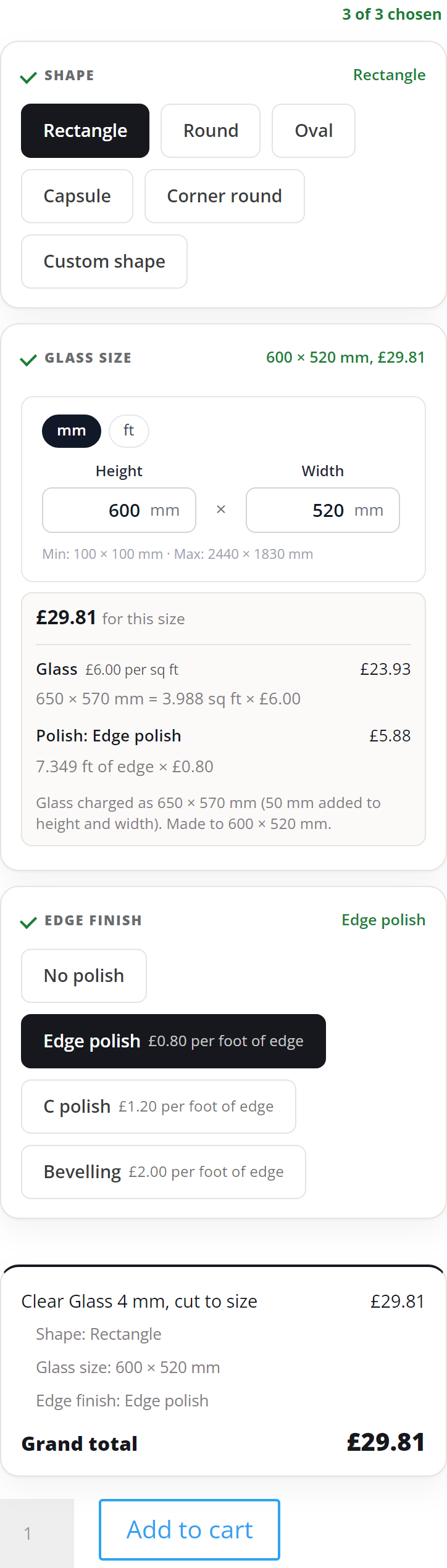
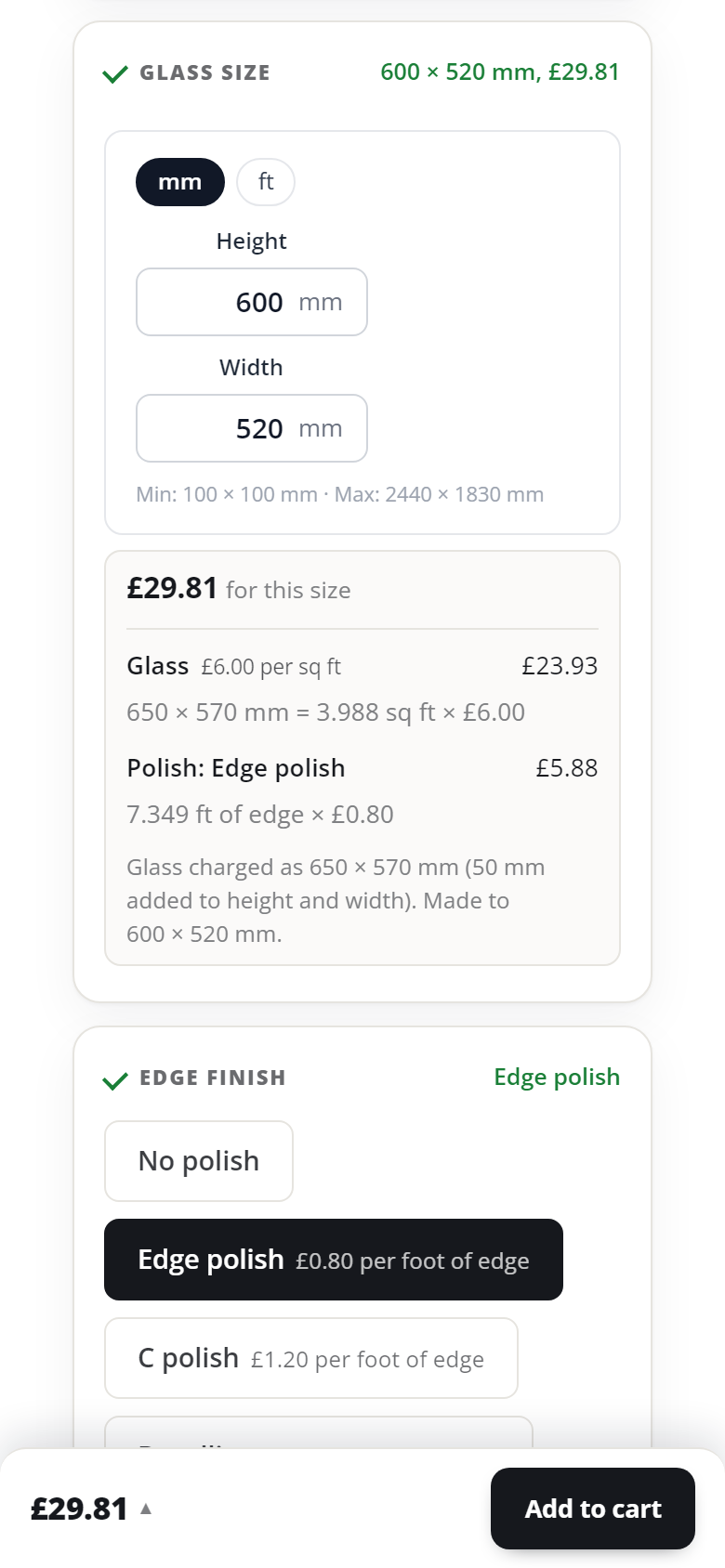
In the cart, on the order and in the emails, the size and the size charged are two rows: “Glass size: 600 × 520 mm” and “Charged as: 650 × 570 mm (50 mm added)”. Your workshop cuts 600 × 520 mm.
With the half foot instead, the second row reads “Charged as: 2 × 2 ft (rounded up)”.
Profile shutters
Section titled “Profile shutters”1. Make the lists
Section titled “1. Make the lists”| List | Choices | Price on the choice |
|---|---|---|
| Handle side | Left, Right, Top, Bottom, No handle | None. It sets the sides, step 3. |
| Handle type | Slim handle, C handle, J handle | Your price, or none |
| Hinge side | Left, Right, Top, Bottom, No hinges | None |
| Glass type | Clear 4 mm, Frosted 4 mm, No glass | None. The rate goes in the size set. |
| Accessories | End caps, Hinges (pair) | Your price per choice. Let customers pick several. |
Two fields carry the details:
- A Number field, Handle offset (mm), for where the handle starts.
- A Message field, Hinge positions.
2. Make the size set
Section titled “2. Make the size set”- Press + New set and start a blank Measured size. Name it Shutter size.
- Add Width first, then Height, both in mm. Width first makes top and bottom the width.
- Type your smallest and largest profile, such as 200 to 1200 mm wide and 200 to 3000 mm high. A shutter is never turned to fit, since that would move its handle.
- Tick Customers can type their own size. Tick mm, and ft too if customers measure in feet.
3. Price it: mixed method
Section titled “3. Price it: mixed method”Profile per running foot, handle per running foot on its side, glass per sq ft.
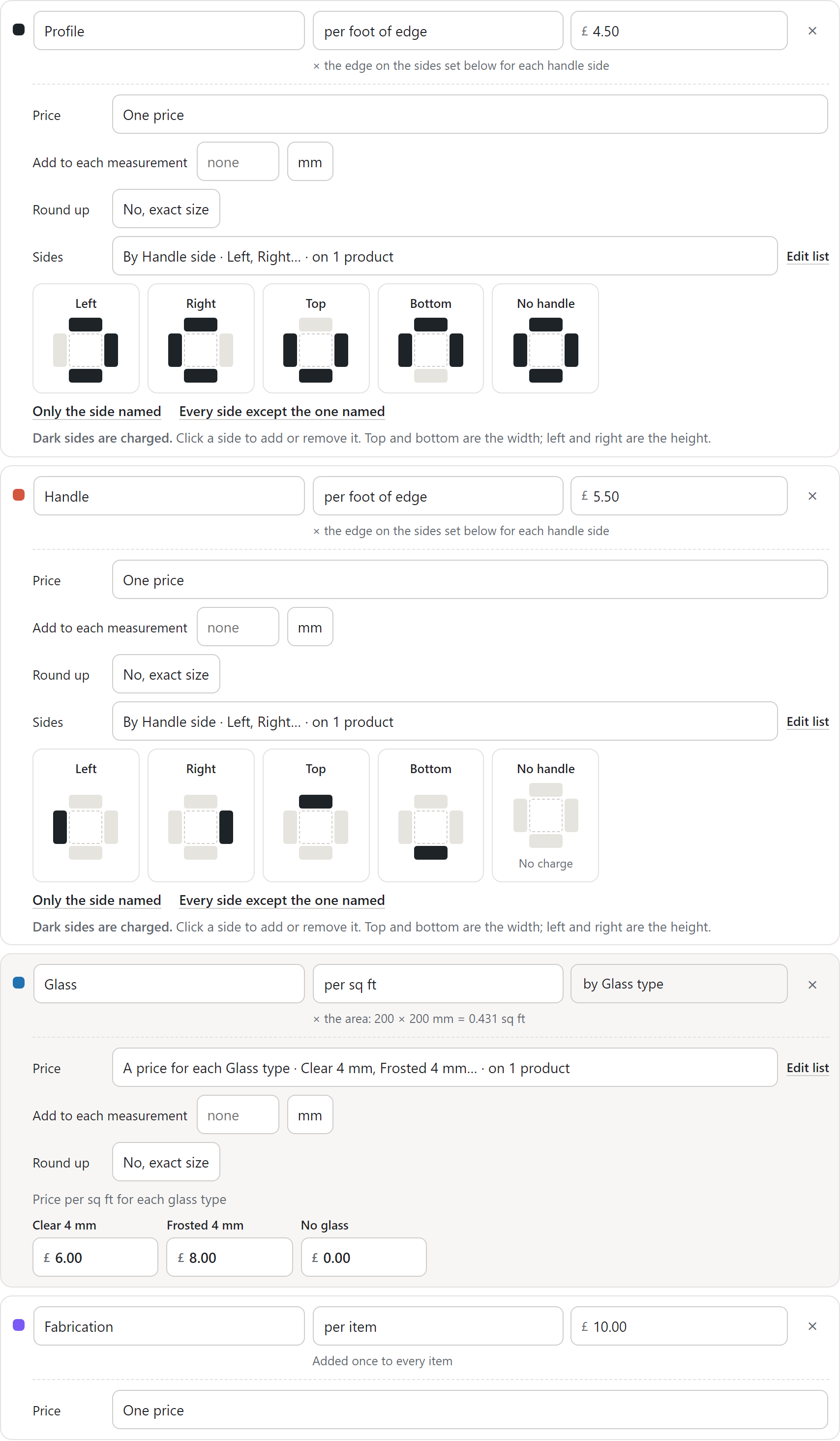
- Profile: per foot of edge, £4.50. Under Sides, choose By Handle side. Press Every side except the one named. Each answer now charges the three sides away from the handle, and No handle all four.
- Handle: per foot of edge, £5.50. Under Sides, choose By Handle side. Press Only the side named. Each answer now charges only the handle’s side. No handle reads “No charge”.
- Glass: per sq ft. Under Price, choose A price for each Glass type: Clear 4 mm £6.00, Frosted 4 mm £8.00, No glass £0.00.
- Fabrication: per item, £10.00.
- Press Save set.
A different side on one answer? Click that side on its square. Dark sides are charged. A choice added to Handle side later, such as Bottom, follows the quick link on its own. One that names no side, such as Both sides, waits until you set its sides.
Or price it: single unit
Section titled “Or price it: single unit”Profile and glass together, per sq ft.
- Add one part, Shutter, per sq ft, such as £15.00.
- For the actual size, leave Round up on Exact size.
- For the half foot round-off, set Round up to 0.5 ft.
Make one size set for each method, and attach the one the product uses.
4. Put it on the product
Section titled “4. Put it on the product”- Open the product, such as 45 mm Shutter, with a price of 0.
- On the Product options tab, attach Shutter size as Required. Handle side and Glass type come with it, right after it, asked the same way.
- Attach Handle type, shown only when Handle side is not No handle. Add Handle offset (mm) under it, with the same rule.
- Attach Hinge side. Add Hinge positions, shown only when Hinge side is not No hinges.
- Attach Accessories as Optional.
- Press Update.
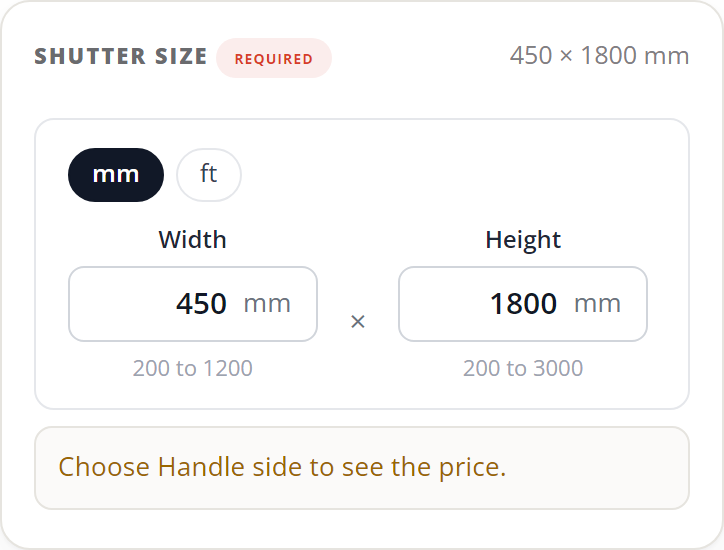
Until Handle side is answered, the size says “Choose Handle side to see the price.”
See conditional options for the rules.
The shutter, worked out
Section titled “The shutter, worked out”A shutter 450 mm wide and 1800 mm high, Clear 4 mm glass. 450 mm is 1.476 ft and 1800 mm is 5.906 ft.
| Part | Handle on the right | No handle |
|---|---|---|
| Profile, £4.50 per ft | Left, top and bottom: 8.858 ft = £39.86 | All sides: 14.764 ft = £66.44 |
| Handle, £5.50 per ft | Right: 5.906 ft = £32.48 | No charge |
| Glass, Clear 4 mm, £6.00 per sq ft | 8.719 sq ft = £52.31 | 8.719 sq ft = £52.31 |
| Fabrication | £10.00 | £10.00 |
| Price for one | £134.65 | £128.75 |
Single unit at £15.00 per sq ft: £130.78 on the actual 8.719 sq ft. Rounded up to the half foot, it’s charged as 1.5 × 6 ft, 9 sq ft: £135.00.
What the customer sees
Section titled “What the customer sees”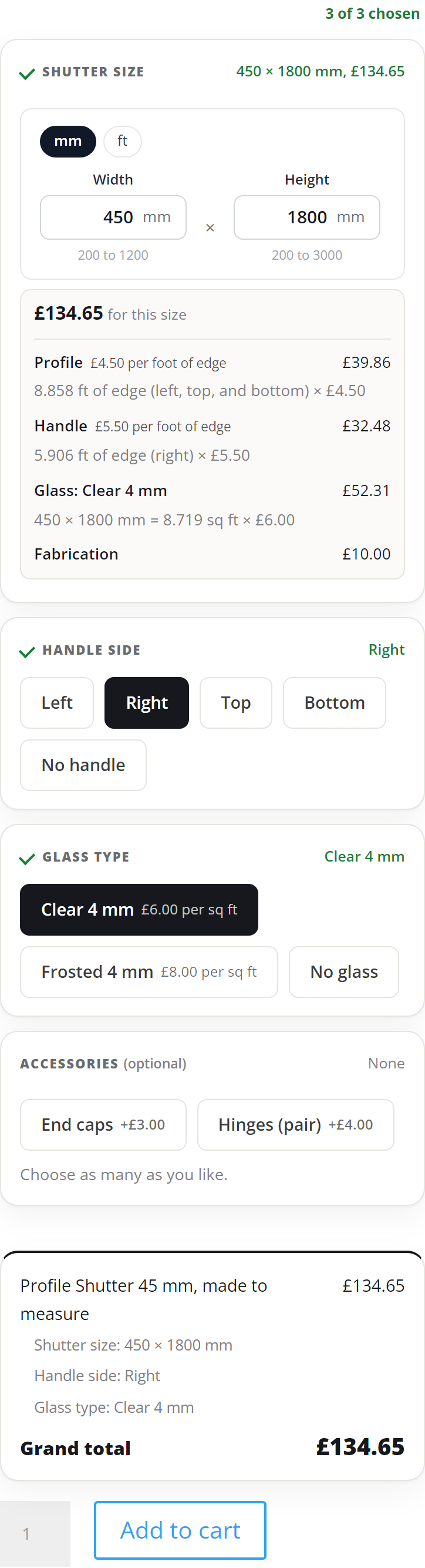
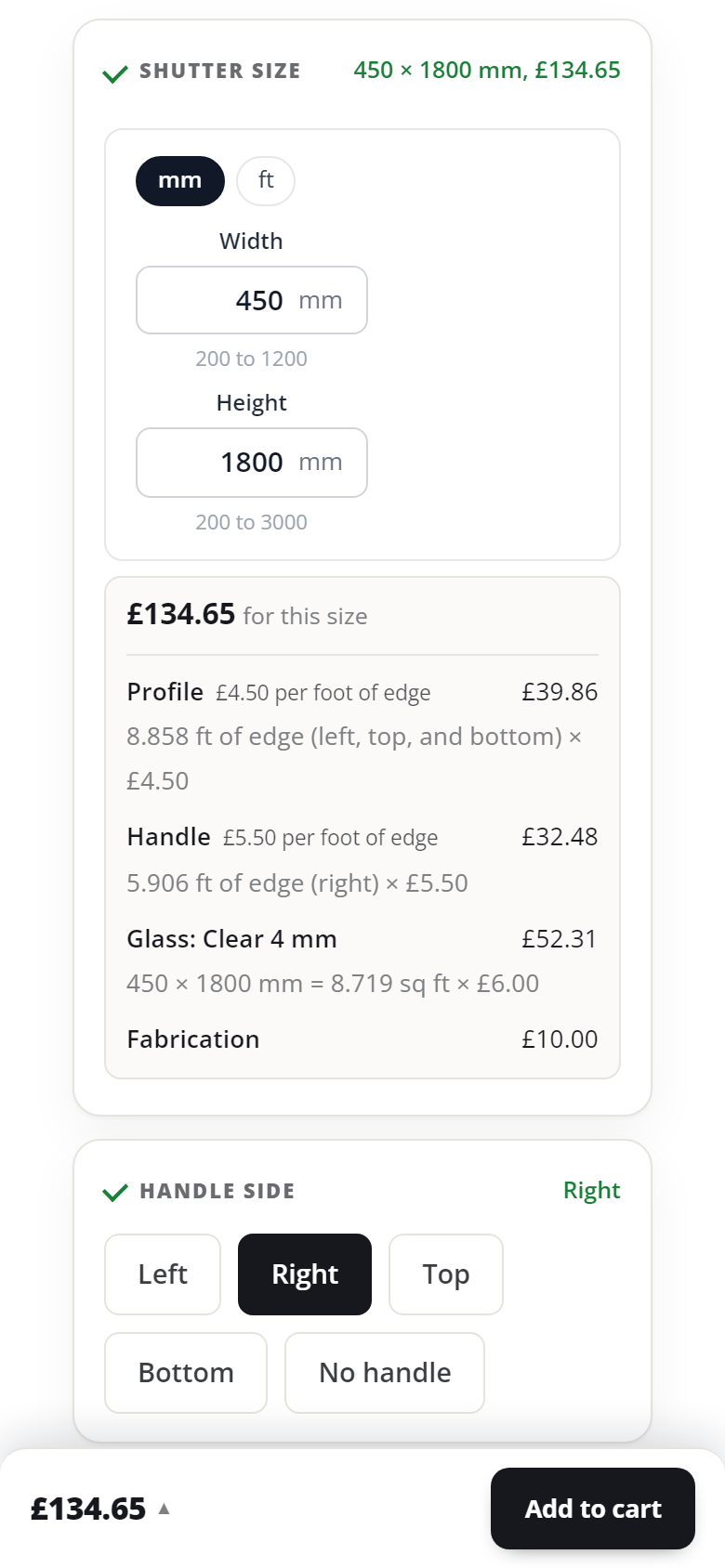
With No handle, the profile runs all round and the handle line goes:
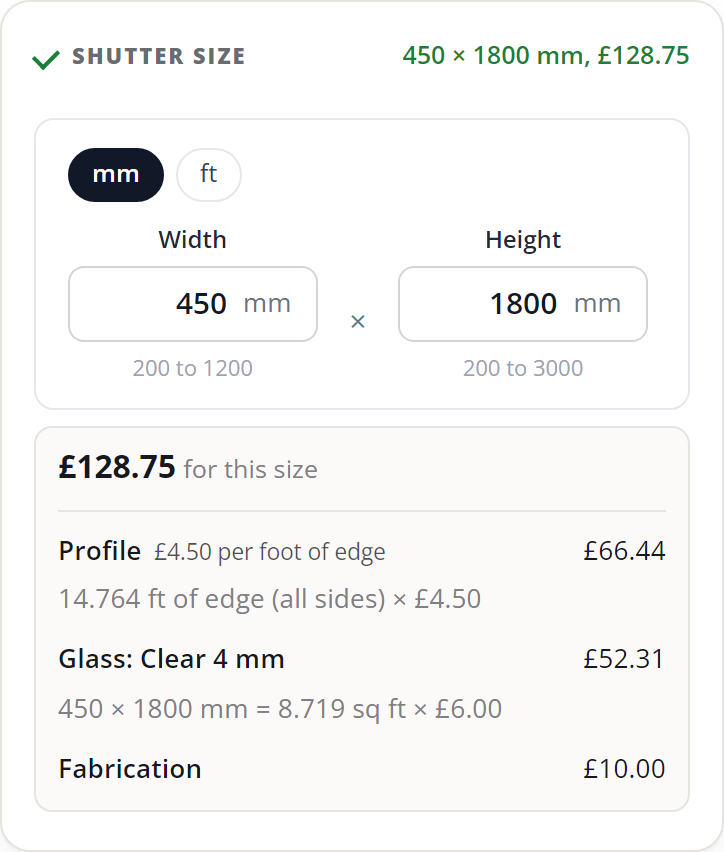
The cart line reads “Shutter size: 450 × 1800 mm / Handle side: Right / Glass type: Clear 4 mm”. The shutter is charged on the size typed, so the line has no second size.
Check before you sell
Section titled “Check before you sell”- Order your smallest and largest size, and one you sell most. Check each price against your own sheet.
- Try a size just over your sheet or profile. The page says why, and Add to cart waits.
- On the glass, try the sheet turned round, such as 1830 × 2440 mm. It’s taken as typed.
- On the shutter, pick each handle side in turn. The profile and handle lines should name the right sides.
- Leave a finish or glass type without a rate. The editor warns you, and the page won’t sell it.
- Place a test order. Read the size and the size charged on the order and in the email. Your order screen also shows each part’s figures, such as “Profile: 8.858 ft of edge (left, top, and bottom)”.
What you should see
Section titled “What you should see”Every size you type shows its price with one line per part, and the lines add up to it. The order shows the size to make. For glass with 50 mm added, it also shows the size charged and why.
Next: read what each setting does in price a size by its parts.
We use cookies to see how people use BossMage and which ads bring them here. They are only set if you accept. Privacy
Cookie choices