
Colour swatches
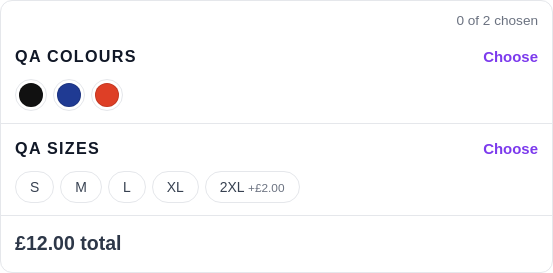
A colour choice reads far better as a swatch of that colour than as a word in a list. AddOnBoss shows any colour option set as a row of swatches, and the customer taps the colour they want.
Set a swatch
Section titled “Set a swatch”- Go to BossMage → Option sets and open the set.
- On a choice's row, press Edit details.
- Under Colour, type a colour name or a code such as #1e2a52. Or click the round swatch and pick a colour.
- Press Save set.
The product page shows a swatch in that colour, with the choice’s name and any price under it.
Let it fill itself in
Section titled “Let it fill itself in”Leave the colour blank and AddOnBoss fills it in from the choice’s name for common colours. Name a choice “Navy” or “Forest green” and the right colour appears. Set a colour by hand only for a name that is not a standard colour, or for your own shade of navy.
Two-tone swatches
Section titled “Two-tone swatches”For a split or marl colour, press Add a second colour in the choice’s details. A “Navy and white” choice then shows a swatch split between the two. This suits sports kit and heather fabrics.
Choose the shape
Section titled “Choose the shape”Under Look in the set editor, pick how the choices draw on the product page:
- Square is the usual.
- Circle suits plain colours.
- Photo card shows each choice as a small card with its picture. It suits a set whose choices carry photos.
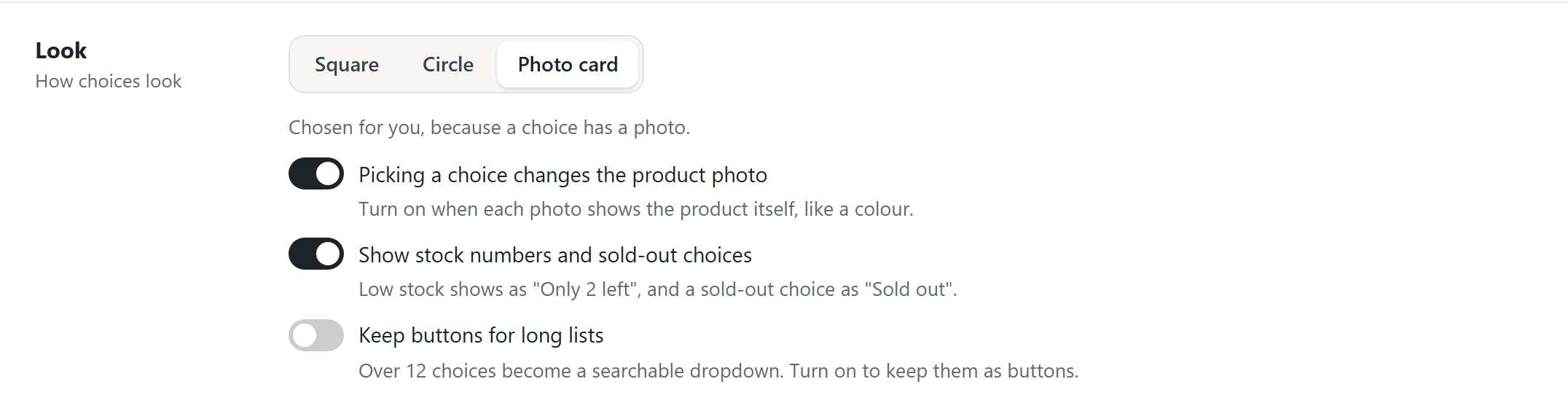
The shape changes only the look. The choices, prices and picks stay the same.
In a photo card set, a choice with no picture, such as No base required, keeps an empty frame. It stands as tall as the cards beside it, so every row of cards is one height. Photo tiles on the quantity grid do the same.
AddOnBoss keeps the shape you chose. On a set with Square or Circle picked, photos on its choices are not shown to shoppers. The editor warns you under Look: "These choices have photos, but swatches are on, so customers never see them." Press Show photo cards to switch in one click. On a set where you never picked a shape, the first photo moves it to Photo card by itself.
Sizes and other choices
Section titled “Sizes and other choices”A set that is not colours, such as sizes, finishes or materials, shows as buttons instead of swatches. You do not set anything for this. A set shows swatches when its choices have colours, and buttons when they do not.
The rule reads the whole set. Swatches show only when every choice in the set has a colour. If even one has none, the whole set shows buttons, so you never get one colour dot among plain buttons.
Swatches work the same on a product's own page, in the quantity grid, and inside a BundleBoss bundle. Both plugins share one option-set library.
We use cookies to see how people use BossMage and which ads bring them here. They are only set if you accept. Privacy
Cookie choices