
Tag your option sets
A shop with three option sets does not need this page. A shop with three hundred does.
Tags are your own words on a group of option sets. Garments. Signage. Christmas. Anything you would use to find a set again. Tag your groups once, and the library narrows to whatever you are working on.
Tags are for you. Shoppers never see them.
This is a Pro feature. It lives on BossMage → Option sets.
Tag a group
Section titled “Tag a group”- On the group's row in the library, press + Tag.
- Type a word. Pick a tag you already use, or press Enter to make a new one.
The tag shows on the group’s row at once. A group can carry as many tags as you like. To take one off, press the cross on it.
Find sets by their tags
Section titled “Find sets by their tags”- Press Tags beside the search box.
- Pick a tag. The library narrows to the groups that carry it.
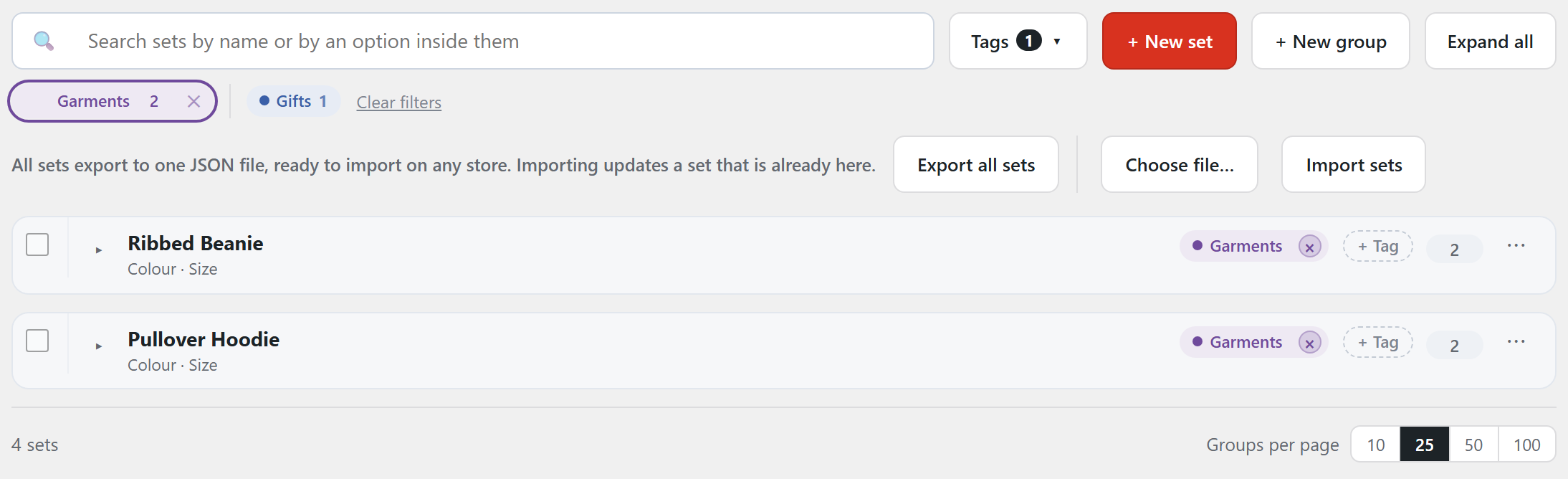
Under the search box, the tags you picked come first, each with a cross to take it off. Other tags follow, with how many groups carry each. Clear filters starts again.
The search box works at the same time. “navy” plus Garments finds the navy sets in your garment groups and nothing else.
Tag a whole run at once
Section titled “Tag a whole run at once”- Tick the box on each group you want.
- In the bar that appears, press Add a tag.
- Pick or type the tag. Every ticked group takes it.
This is the fast way to file a library that grew without tags. Search for what belongs together, tick it all, tag once.
Rename, recolour, merge or delete
Section titled “Rename, recolour, merge or delete”Open Tags and press Manage tags. It does four things:
- Rename. The new name shows everywhere that tag was used.
- Recolour. Each tag carries a colour dot so you can spot it at a glance.
- Merge. Two tags that mean the same thing become one. Every group on either tag ends up on the one you keep.
- Delete. The tag goes. The groups and their sets stay as they are.
Once two tags are merged, AddOnBoss cannot tell which group came from which. Rename first if you are not sure.
Tags from a supplier
Section titled “Tags from a supplier”Groups that arrive from a supplier feed carry the supplier’s own tags, and the feed keeps them up to date. Import more from the same supplier and the new groups get them too.
Those tags are locked. Changing one by hand would be undone on the next run.
If Pro lapses
Section titled “If Pro lapses”The library looks as it does on the free plugin. It shows no tags, no tag filter and no tag button. Your tags are kept and come back with Pro. A saved link with a tag in it opens the whole library.
Related
Section titled “Related”- Option sets for what a set is and how to build one
- Attach options to a product for putting a set on a product
- Import & export for moving sets between shops
We use cookies to see how people use BossMage and which ads bring them here. They are only set if you accept. Privacy
Cookie choices