
Edit options from the cart
A customer who spots a wrong size or a misspelt name in the cart can fix it in place. They don’t have to remove the item and start again.
Every cart line with options has an Edit options link. It reopens the product with every choice filled in.
It’s free and always on. Nothing to set up.
How your shopper fixes a line
Section titled “How your shopper fixes a line”- In the cart, they press Edit options under the product name.
- The product page opens with every choice filled in.
- They change what they need.
- They press Update cart.
They land back on the cart, with the corrected line in the same place.
Where the link shows
Section titled “Where the link shows”- On the cart page and in the mini cart, under the name of any line with options. That includes choices, fields, a typed or measured size, an upload and a print area.
- Not at checkout. Checkout is for checking, not editing.
- Not on plain lines with no options.
- Not on quantity grid lines. A grid order is many lines from one grid, so it’s changed on the product’s grid.
- Not on lines inside a BundleBoss bundle. The bundle has its own way to edit.
What comes back filled in
Section titled “What comes back filled in”Everything the customer chose comes back as it was:
- choices and swatches
- every field, as typed
- a typed or measured size, as entered
- the print area
- the quantity
- each block of a repeating section
A choice that unlocked another option unlocks it again.
An uploaded file shows as a chip with its file name. The customer keeps it, or removes and replaces it. Nobody uploads artwork twice to fix a size.
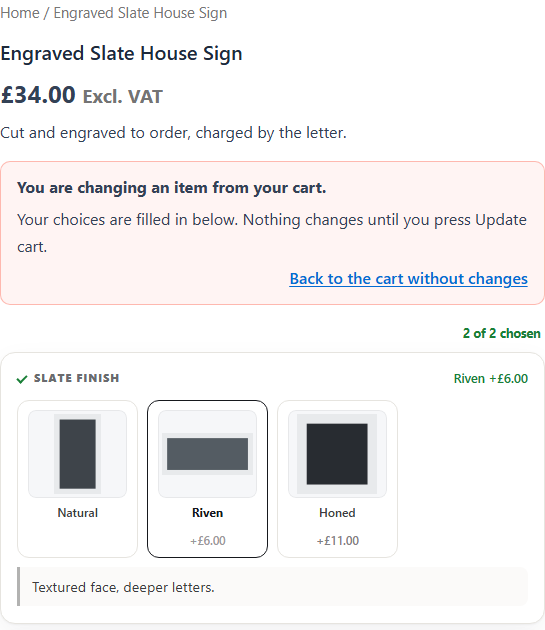
A banner at the top reads You are changing an item from your cart. Beside it, Back to the cart without changes leaves everything as it was.
When the update can’t go through
Section titled “When the update can’t go through”The new choices are checked like any add to cart. For example, a required field left empty, a size outside its limits, or not enough stock.
If the check fails, the original line stays in the cart, untouched. The customer sees what to fix, and is still editing. They fix it and press Update cart again.
If the line has gone, say bought in another tab, the page says so and starts fresh.
What you should see
Section titled “What you should see”Add an item with options to your cart, then press Edit options. The product opens with your choices filled in and the banner at the top. Change a choice and press Update cart. The cart shows the same line, in the same place, with the new choice.
We use cookies to see how people use BossMage and which ads bring them here. They are only set if you accept. Privacy
Cookie choices