
Option photos
Option photos are part of AddOnBoss Pro. Free products still show swatches and pills; the per-option image swap is the Pro addition.
An option can carry its own photo. A colour chip then shows the garment in that colour, and picking it swaps the product’s main image the way choosing a variation would. It makes a simple product with option sets feel exactly like a variable one, without the variations.
Set a photo on the set, once
Section titled “Set a photo on the set, once”- Go to BossMage → Option sets and open the set.
- On a choice's row, press Edit details.
- Under Photo, click the tile and pick an image from your media library.
- Repeat for each choice, then press Save set.
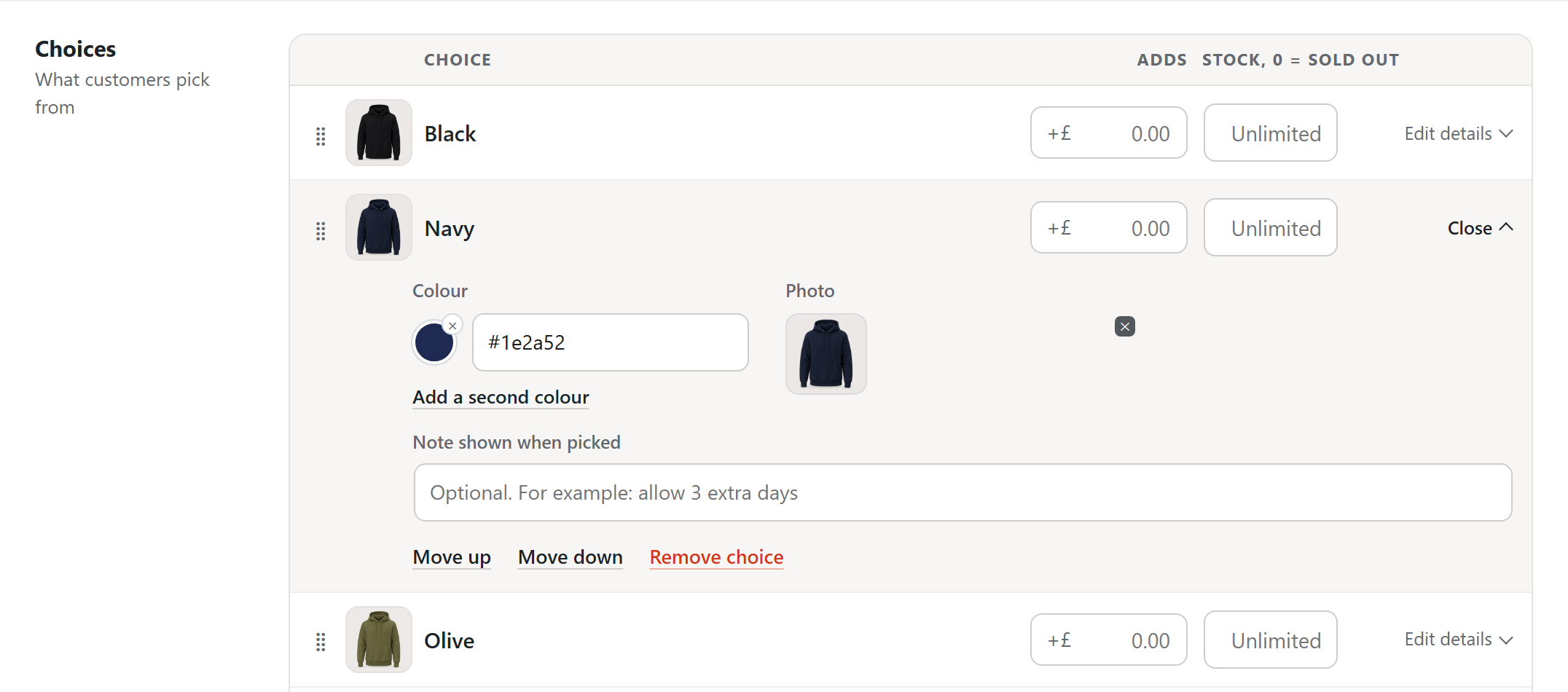
Every product that uses the set now shows the same pictures. Build “Where do you want it printed?” once, with a photo on Front chest, Full back and Left sleeve. It arrives complete on every garment you put it on.
Use the set’s photo when the picture describes the choice rather than the product: print areas, finishes, frame styles, engraving faces.
Or set one on a single product
Section titled “Or set one on a single product”On the Product options tab, each option also shows a photo tile. A photo set there applies to that product only. It beats the set’s own picture for that product, the way a product’s own price beats the set’s price. Clear it and the set’s picture comes back.
Use this for what the set cannot know, such as your navy hoodie photographed on your model.
When shoppers pick several
Section titled “When shoppers pick several”A set can let shoppers take more than one choice. Each choice they take carries a tick on its corner, and each pick keeps its own line and its own charge.
On a set like that, the product photo stays where it is. To show the latest pick’s photo instead, turn on Picking a choice changes the product photo under Look.
When the photos explain the choice
Section titled “When the photos explain the choice”Some sets carry pictures of the product, and some carry pictures that explain a choice. In a colour set, picking blue should show the blue product. In a Cutting options set, the cards show diagrams of a square corner, a radius and a contour cut. Swapping the product photo for a line drawing would confuse a shopper.
Under Look in the set editor, the switch Picking a choice changes the product photo decides this. Leave it on for a colour set. Turn it off for a set of diagrams. The cards still show their pictures, but the product photo stays put.
If your product page has its own photo carousel
Section titled “If your product page has its own photo carousel”Some shops replace the standard WooCommerce gallery with a carousel built into the page template. AddOnBoss can move a carousel built with Swiper to the picked colour’s photo. When the colour is cleared, it moves back to the first photo. The colour’s photo has to be one of the carousel’s slides: AddOnBoss shows a slide you already have and never replaces one. A carousel built another way is not changed.
An option photo is never cropped to fill its card. Whatever shape you upload, tall, wide or square, is shown complete, so a diagram keeps its corners and a shaped product keeps its shape.
Suggest photos does it for you
Section titled “Suggest photos does it for you”Setting a photo on every colour of every product by hand is a chore, so you do not have to. Suggest photos, on the Product Options panel, reads the product’s gallery and your media library and matches a photo to each option by name.
- Click Suggest photos. AddOnBoss proposes a photo for each option it can match.
- Each proposal shows the reason it matched, so you can see why a photo landed on an option.
- Review, adjust anything you disagree with, then apply and save. Nothing changes until you do.
It matches on more than an exact name. A file called black.jpg, or an image titled Black, lands on your Black option. It works the same for sizes and finishes, not only colours. It also reads the trade codes suppliers put in file names, so a photo called RX500-BLK-FRONT finds Black too.
Suggest photos never changes your product on its own. It proposes, shows its reasoning, and waits for you to apply and save. An option it cannot match confidently is left for you to set by hand.
We use cookies to see how people use BossMage and which ads bring them here. They are only set if you accept. Privacy
Cookie choices