
Quantity grid
The quantity grid is part of AddOnBoss Pro.
A quantity grid lets a customer order every colour and size in one go. They type a quantity for each size they want, then add the whole run to the cart with one button.
It suits team orders and workwear, where one order holds many colours and sizes.
Turn it on
Section titled “Turn it on”- In the WordPress menu, go to Products and open the product.
- In Product data, open the Product options tab.
- Attach a colour set and a size set. See attach options to a product.
- Open How customers order this and choose Quantity grid.
- Check the star marks Main on the colour and size rows.
- Press Update.
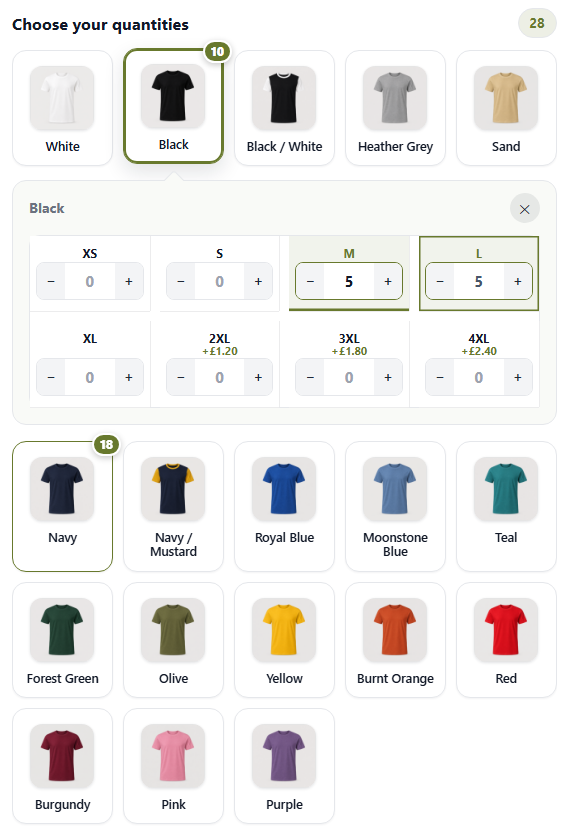
The product page now shows a tile for each colour. Each tile opens a quantity box for every size.
The two sets marked Main build the grid. A grid needs at least one. With none, the tab says No main choice is picked, so there is no grid to show. Shoppers then order the product one at a time.
What your shopper sees
Section titled “What your shopper sees”- They press a colour tile, and its sizes open.
- They type a quantity in each size they want, or use + and −.
- They repeat for other colours. Each tile shows how many it holds.
- They press Add to cart. Each colour and size goes in as its own cart line.
Where the sizes open
Section titled “Where the sizes open”- On a computer, the sizes open in a row right under the tile. Press the tile again, the × or Escape to close it.
- On a phone, the sizes open in a panel from the foot of the screen. Press Done, the phone’s Back gesture or Escape to close it.
- A sold-out size says Sold out and takes no quantity.
- A colour sold out in every size is greyed and says Sold out.
After Add to cart, the grid stays on the page with “Added 28 items to your cart.” and a View cart link. They can add another run straight away.
Choices for the whole order
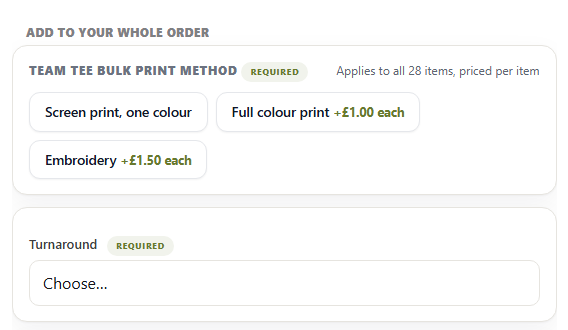
Section titled “Choices for the whole order”Any set that isn’t a Main set is asked once for the whole order, under the grid. For example, the print method or a turnaround time. The heading reads Add to your whole order.
Each set says how it is charged:
- Applies to every item, priced per item adds its price to every item in the run.
- Applies to every item, charged once adds its price once, however many are ordered.
You set this on the set’s row in the Product options tab. See pricing and fees.
When something is still to choose
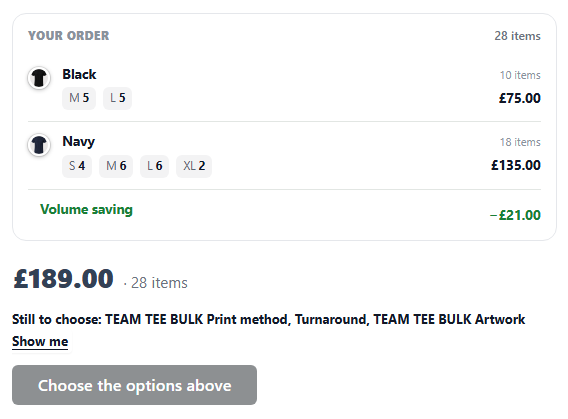
Section titled “When something is still to choose”Required sets and fields say Required. Until they’re answered, the grid names them above the button, such as “Still to choose: Print method, Turnaround”. Show me jumps to the first one.
The button reads Choose the options above until everything is answered.
Sets where they can take several
Section titled “Sets where they can take several”A whole-order set can let the customer take more than one choice. For example, “Choose up to 2” print areas: they take Front chest and Full back, and both are charged.
A pick past your limit is refused on the page and again in the cart. If the choices carry photos, they show as photo cards with a tick on each one taken.
What a grid will not show
Section titled “What a grid will not show”Some sets can’t go on a grid. The tab names them, and says they won’t be shown or charged:
- a set that only appears under a condition
- a price table or a measured size, because the shopper picks one size for the whole order
To use one of these, switch the product back to One at a time.
How the questions are laid out
Section titled “How the questions are laid out”The questions under the grid follow the arrangement you chose under How this page looks.
Prices on choices
Section titled “Prices on choices”Prices on choices sets what each choice says about its price. It’s under How customers order this. A product that can’t use the grid has it under its own Prices on choices heading in the same place.
- Automatic is the standard look. The grid shows what each colour or size adds, such as +£0.40. Buttons show whole prices or differences, whichever reads clearest.
- Differences only marks just the choices that cost more, such as +£1.50.
- Full price on the first list shows the first list at full price, such as £20.50 for a larger sign. Every list below shows what it adds, such as +£5.00. On a grid, the grid is the first list.
- Hidden shows no figures on the choices. The total still shows the price.
With Hidden on a product with several lists, Still show prices on appears (Pro). Tick each list that keeps its prices, such as Artwork check at +£5.00.
Whatever you pick, the amount charged stays the same.
Good to know:
- The first list is the top row with prices on the Product options tab. Drag the one you want to the top.
- Lists shown instead of each other count as the first list too. A floor sticker that asks the shape first, with a size list for each shape, shows full prices on whichever size list the shape opens. A choice that opens a size the customer types in, such as Enter my own size, shows no figure.
- A list where they pick several always shows what each choice adds.
- On a variable product, a bundle or a subscription, every list shows what it adds.
- Inside a BundleBoss bundle, the grid follows the same setting. Needs BundleBoss 6.3.0. See prices on colours and sizes.
Quantity breaks in the grid
Section titled “Quantity breaks in the grid”With quantity discounts, the whole run counts as one order. 8 Medium, 8 Large and 9 XL polos make 25 polos, and every one takes the 25 price.
The breaks table sits with the grid. Its Each column adds the per-item choices already picked, so a printed polo shows the printed price.
A colour or size that costs more keeps its extra charge at every break, unless Option prices, per item is ticked. See options and the discount.
The total follows you down the page
Section titled “The total follows you down the page”On a long grid, the total and the button can scroll out of sight. A slim bar then appears along the foot of the screen. It shows the total, how many items, and its own Add to cart button.
Tap the total in the bar to see the order summary. The bar only appears once there is something to add. Nothing to set up.
Prices with or without VAT
Section titled “Prices with or without VAT”The grid shows prices the way your shop does, with or without VAT, as set in WooCommerce. If your shop has a VAT switch, the grid follows it both ways.
Variable products on a grid
Section titled “Variable products on a grid”A variable product can use the grid too. It asks its option sets under the grid, as a simple product does.
If an add is refused, the reason shows beside the button. A product with no price says so before anyone starts.
On the order
Section titled “On the order”Each colour and size reaches the order as its own line, named the way it was chosen. The pick list reads one row at a time.
Pair the grid with print areas, so a team order carries one logo placement for the whole run.
What you should see
Section titled “What you should see”Open the product page as a shopper. You should see a tile for each colour under Choose your quantities. Open a tile, type a quantity, and the order summary and total update. Answer every Required set, and the button reads Add to cart.
We use cookies to see how people use BossMage and which ads bring them here. They are only set if you accept. Privacy
Cookie choices