
Quantity grid inside a bundle
The grid on a product's own page moved to AddOnBoss. The grid inside a bundle, described below, is still BundleBoss.
Someone ordering forty team shirts rarely wants forty identical ones. They want a run: a few of each size, across several colours. Adding each combination to the basket one at a time is slow and easy to get wrong.
A quantity grid lets a customer set a quantity per colour and size in one grid, and add the whole run at once.
The grid inside a bundle, described on this page, is a Pro feature. The grid on a product’s own page belongs to AddOnBoss and is priced there.
Which grid you want
Section titled “Which grid you want”There are two, in two plugins, because they answer two different questions.
| You want | Plugin | Docs |
|---|---|---|
| A product on its own page ordered as a size run | AddOnBoss | Quantity grid |
| An item inside a bundle ordered as a size run | BundleBoss | this page |
Most shops selling teamwear or workwear want the first one.
The grid inside a bundle
Section titled “The grid inside a bundle”When a bundle contains a variable item, that item can be configured as a grid instead of one-at-a-time. A shopper building a kit picks their sizes across the range in a single step, and the whole run joins the bundle as one configured item.
- Add a variable product as a bundle item.
- On the Bundle Display tab, set Show repeated items as to Quantity grid. A bundle created with the Builder opens on it already.
- Choose which two attributes form the grid. Colour down one side and size across the top is the usual pair.
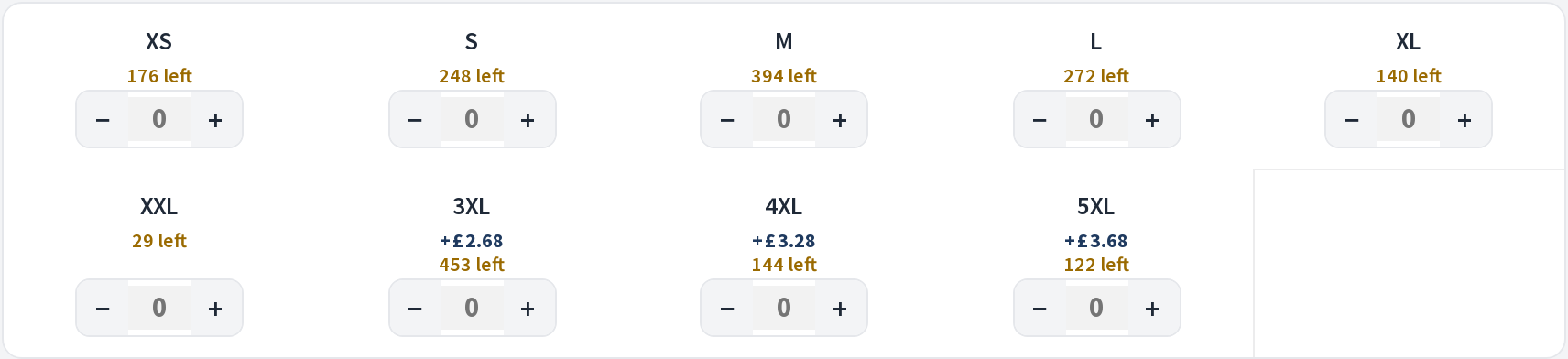
Quantities are checked against your stock the same way every other bundle item is, so a size that has run out cannot be ordered. A cell shows how many are left in the same words as the product’s own page, and its stepper stops there. A size nobody counts shows nothing. See stock and fulfilment.
Where a colour’s sizes open
Section titled “Where a colour’s sizes open”When colours show as tiles, pressing a tile opens that colour’s sizes.
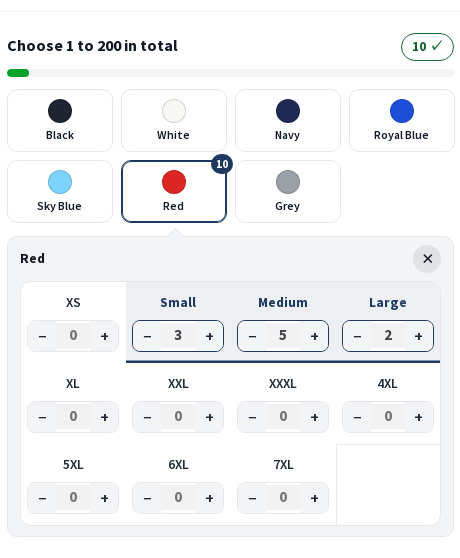
- On a computer, they open in a row right under the row of tiles, headed with the colour’s name and pointing at the tile you pressed. The tile stays where it was. Press the tile again, the row’s close button or Escape to close it.
- On a phone, they open in a window from the foot of the screen, with the colour’s swatch or photo and its name at the top. Press another tile and the window shows that colour instead. Done, the phone’s Back gesture or Escape closes it.
Each tile shows how many it holds once it has quantities.
Pricing
Section titled “Pricing”Each cell prices from its own variation, so a larger size that costs more still costs more inside the grid. Bundle discounts apply to the run as a whole, exactly as they do to any other item.
If the product sells cheaper by quantity on its own page, the grid keeps that price: it counts every unit across colours and sizes, and every unit takes the break that count reaches. See a product’s own quantity price.
Prices on colours and sizes
Section titled “Prices on colours and sizes”A garment’s colour tiles and size cells show their prices the way the product’s own page does. The product decides, with its Prices on choices setting in AddOnBoss:
- Differences only: a dearer colour’s tile reads +£0.40, a dearer size’s cell +£2.68, and the cheapest show nothing.
- Full price on the first list (called Every price before AddOnBoss 2.6.0): each colour’s tile shows its own price, and each size’s cell its own.
- Hidden: no figures.
- Automatic: differences on the tiles and cells, and nothing on a table’s headings.
The colour by size table marks its headings the same way, and only where every row agrees on the figure. A row whose Item prices are hidden shows none. Needs AddOnBoss 2.3.0.

Charges that apply once for the whole run rather than per item, such as a setup fee, are handled by the field's own charge mode. See personalisation.