
The cart row
Pro The cart row is a row of a few extras in the cart and in the side cart, headed You may also like. Your shopper adds one with a single press, without leaving the cart.
The extras come from what is already in the cart. Think of a T-shirt in the cart, with matching socks and a beanie offered beside it.
Switch it on
Section titled “Switch it on”- In the WordPress menu, go to BossMage, then BundleBoss, and open the Bought together tab.
- Turn on Also in the cart: You may also like. It’s on unless you switched it off.
- Optional: press Edit and choose how many extras show, from one to four.
- Press Save changes.
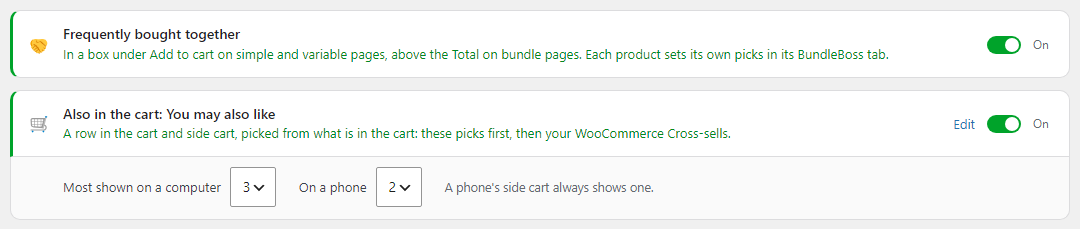
- Most shown on a computer is 3 to start with.
- On a phone is 2 to start with.
- A phone’s side cart always shows one.
Switched off and saved, the row leaves the side cart straight away, on the next page your shopper opens. If you use WP Rocket, saving a change on the tab also empties its page cache, so cached pages show the change too.
How it picks the extras
Section titled “How it picks the extras”The row looks at each product in the cart and offers, in this order:
- The product’s own picks, from Offer products with this one in its BundleBoss tab. See Frequently bought together.
- For a product with no picks of its own, the picks of its category, tag or brand. See Picks by category.
- Then the product’s WooCommerce Cross-sells.
An extra added from the row keeps the product’s bought-together discount. With 10% off on a hoodie’s picks, its beanie shows at £13.49 instead of £14.99.
What your shopper sees
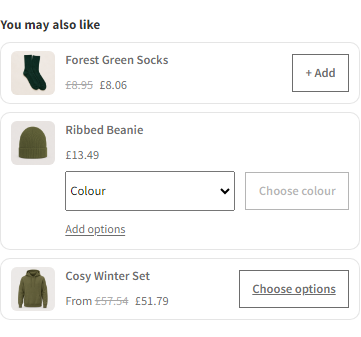
Section titled “What your shopper sees”On the cart page, the row sits under the cart totals, with the heading You may also like. Each extra shows its picture, name and price.
- A plain product has a + Add button. One press puts it in the cart.
- A product in colours or sizes asks for them in the row. The button reads Choose colour until one is picked, then + Add.
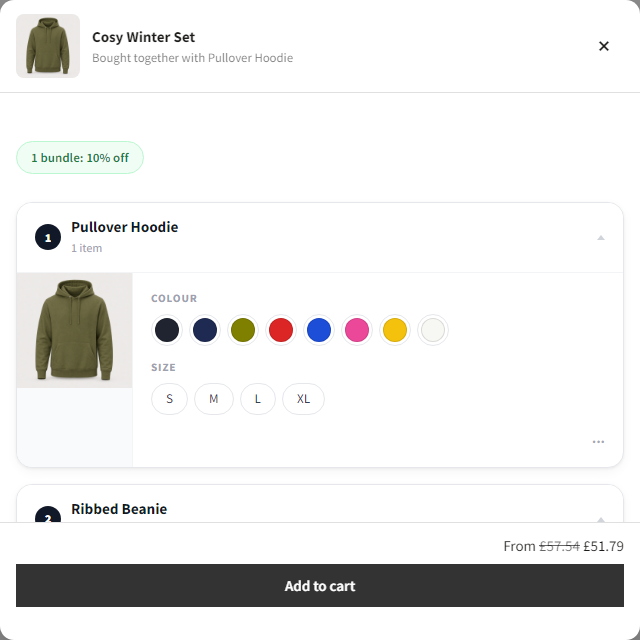
- A product with more colours and sizes than a row can hold, with options of its own, sold on a quantity grid, or a bundle or grouped product, has a Choose options button. It opens the same window as on the product page, and Add to cart in the window puts it in the cart.
- A product whose AddOnBoss options are all optional also shows Add options under its price. + Add puts it in as it is. Add options opens its own page in the window, and it goes in with what was added.
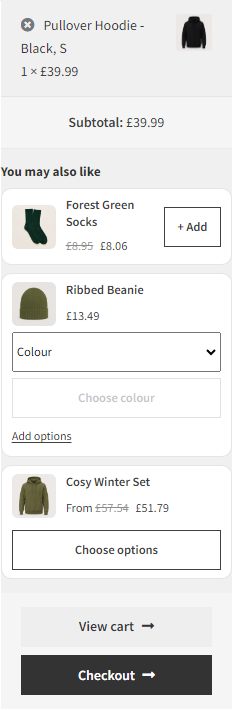
The side cart shows the same row above its View cart and Checkout buttons.
What you should see in the cart
Section titled “What you should see in the cart”After + Add, the extra is a line of its own in the cart, and it leaves the row.
Good to know
Section titled “Good to know”- The row shows only when something qualifies. With nothing to offer, there’s no row.
- It never offers something already in the cart, or out of stock.
- It never offers a gift the cart already owes from an offer. That one is chosen as the gift, free.
- The row works in a side cart that fills after the page loaded. That happens when a shopper lands with an empty cart and adds without a reload. It works on cached pages too. Choosing a colour there wakes its button, and + Add goes in without a reload.
- With free gifts by spend, the side cart shows the gifts above You may also like.
We use cookies to see how people use BossMage and which ads bring them here. They are only set if you accept. Privacy
Cookie choices