

1 · A rate
So much per metre, per square metre or per cubic metre. Above, 250 × 120 cm is 3 m² at £12: £36.00.
Use it when your price really is a rate, and should be exact at every size.
BannersVinylFabric by the metreWorktopsRope
The customer types a width and a height, and the price follows. Per square metre, or straight from the price list you already work from. One product, no variations.
So much per metre, per square metre or per cubic metre. Above, 250 × 120 cm is 3 m² at £12: £36.00.
Use it when your price really is a rate, and should be exact at every size.

Widths down one side, drops or heights across the other, your price in every box. Above, 120 cm wide by 150 cm drop: £64.00. Try it on the demo
Use it when you price from a sheet, prices step in bands, or a supplier gave you the grid.
This is the rule AddOnBoss uses for a rate: area times the rate, and never below the minimum. Set here to the banner above, £12 per m² with a £15 minimum.
3.00 m² × £12
You need AddOnBoss Pro.
Go to BossMage, then Option sets, and press + New set. Under What kind of set?, press Start blank on the Measured size card.
Or press or use a template to start from a ready-made set.
Name the set, then name what customers measure and pick a unit for each.
Width and Height price by area. One measurement prices by length, three by volume. Units can be mm, cm, m, in or ft.
Type the smallest and largest size you make.
A size outside them cannot be ordered, so nobody buys a size you cannot make. Customers can type any whole unit. Press Change to allow only steps, such as steps of 10.
Under Price, choose per m² and type your rate. Then type a minimum price.
The minimum is a floor, not an extra. Charge set-up or edging too? Press + Add a part. The bar under the parts prices a sample size as you type.
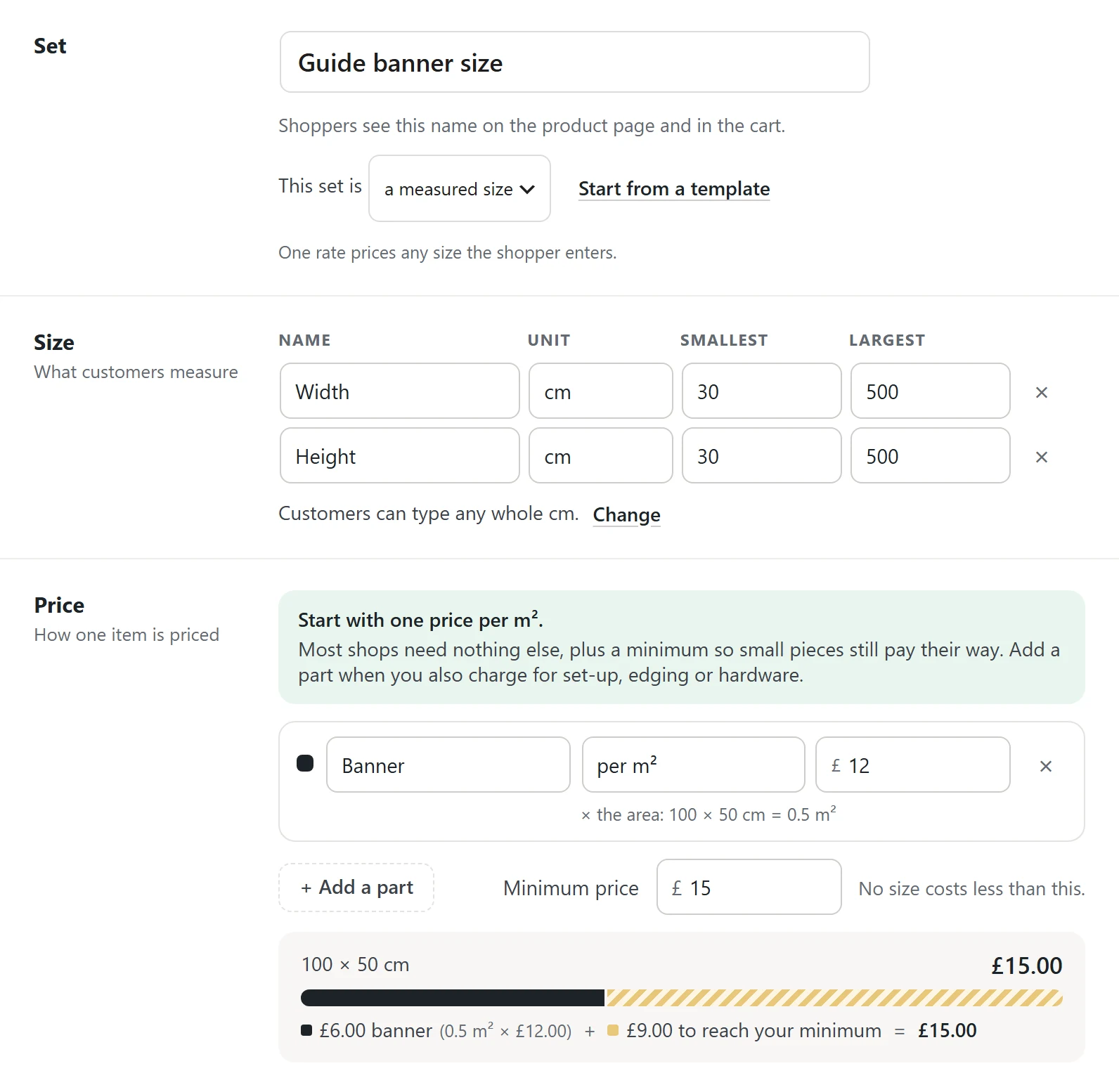
Add ready-made sizes for your popular ones, press Save set, then attach the set on the product's Product options tab.
Each size is priced from your rate unless you type a price of its own. Tick Customers can type their own size, and Custom size sits beside them for everything else.
Press + New set, then Start blank on the Price table card. Under Priced by, choose Two things, like width and drop.
Name what goes down the side and across the top, such as Height and Width. Then type your price in each box.
Add a row or a column for each size you sell. An empty box is a size you do not make. Already have a sheet? Press Paste from a spreadsheet. Customers pick Width first. Press Swap to ask the other one first.
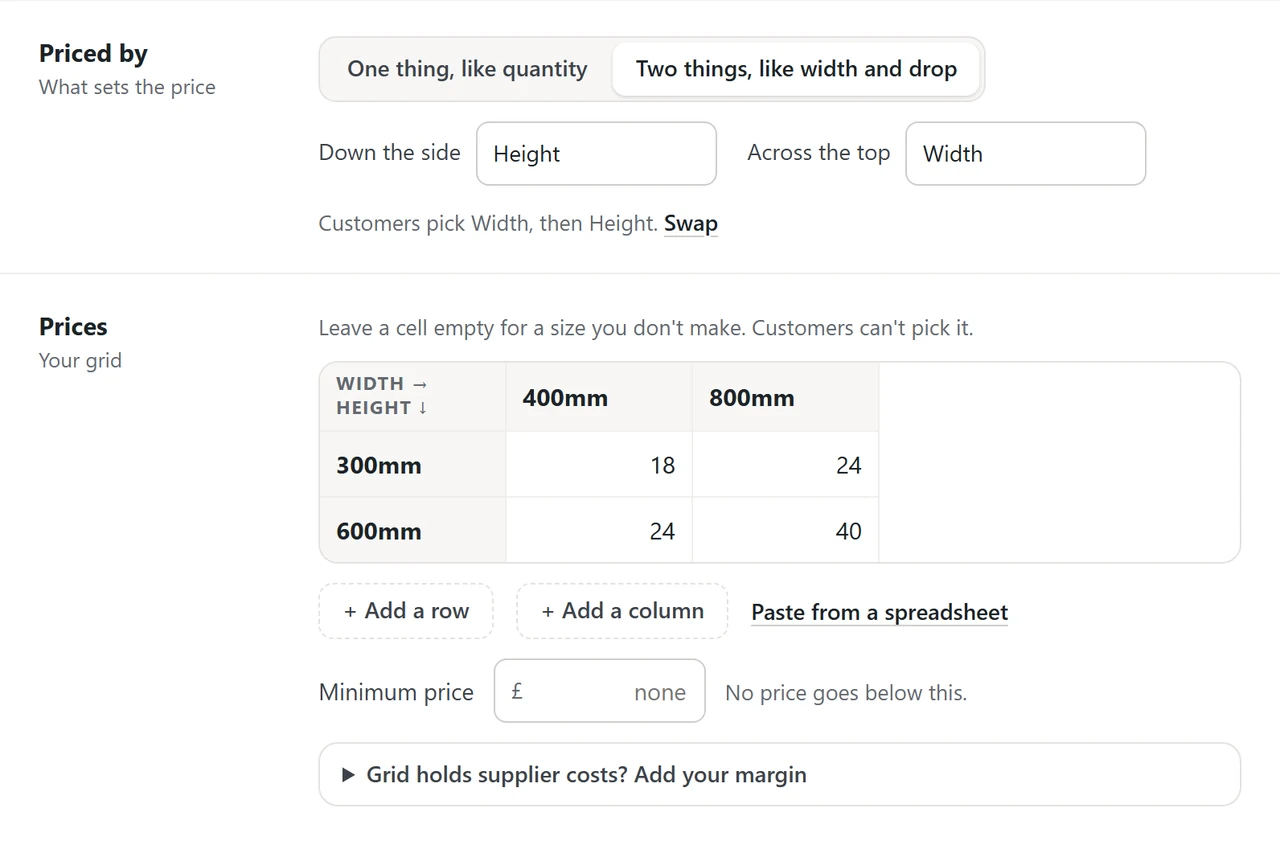
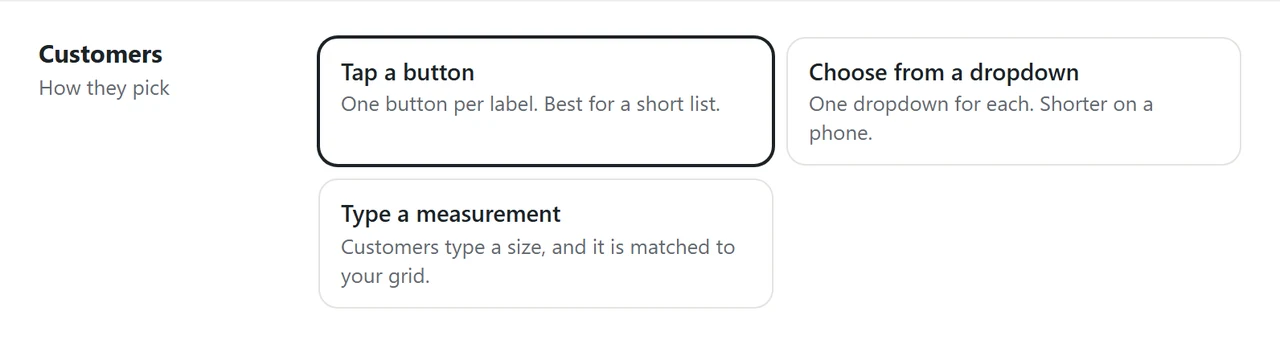
Under Customers, choose how they pick: tap a button, choose from a dropdown, or type a measurement that is matched to your grid.
With a typed size, you choose what happens between two sizes: round up, round down, go to the nearest, or match exactly.
Choose whether the table sets the whole price or adds to the product's price. Press Save set, then attach the set to the product.
Only for a fixed list. Core WooCommerce can give each variation its own price, so Small, Medium and Large can cost different amounts, but it cannot work out a price from a width and height the customer types. That needs a measurement pricing feature.
Yes. Measure in feet or inches and the rate is charged per sq ft. You can also price in millimetres and let customers type their size in feet or inches: they pay the same either way, and the order shows the size the way they typed it, such as 8 × 4 ft.
You choose for each measurement: round up to the next size, which never prices a piece as smaller than it is, round down, go to the nearest, or match a size exactly. A size bigger than your largest cannot be ordered, so it is never guessed.
Yes. A table can be panel size by thickness, or size by material, so a 10 mm sheet costs what it really costs at every size instead of carrying one flat surcharge.
It is part of AddOnBoss Pro, which has a 14-day free trial with no card needed. The free AddOnBoss on WordPress.org covers fixed choices, extras and personalisation priced by WooCommerce.
Every setting: measured sizing and price tables in the documentation. See more on the acrylic sign, priced by size and thickness. Or start earlier: add product options without variations.
We use cookies to see how people use BossMage and which ads bring them here. They are only set if you accept. Privacy
Cookie choices