
How to build a build-a-box in WooCommerce
Let customers fill their own box, pick any six chocolates, any four candles, a mixed case of wine, and buy the lot as one order. WooCommerce cannot do this alone, so here is the short way to set it up, no code.
A build-a-box (or "mix and match", or "build your own box") is a pool of products with a target size. The customer chooses which items go in, up to the count and limits you set, and checks out with a single line on the order. It is one of the highest-converting things you can offer, and core WooCommerce has no way to do it, so you add a plugin. Below is the whole setup with BundleBoss.
Set it up in six steps
- Install a bundle plugin. WooCommerce cannot do a build-a-box on its own, so you need a plugin for it. Install BundleBoss (free from WordPress.org). The fixed-bundle features are free; the mix-and-match build-a-box is in Pro.
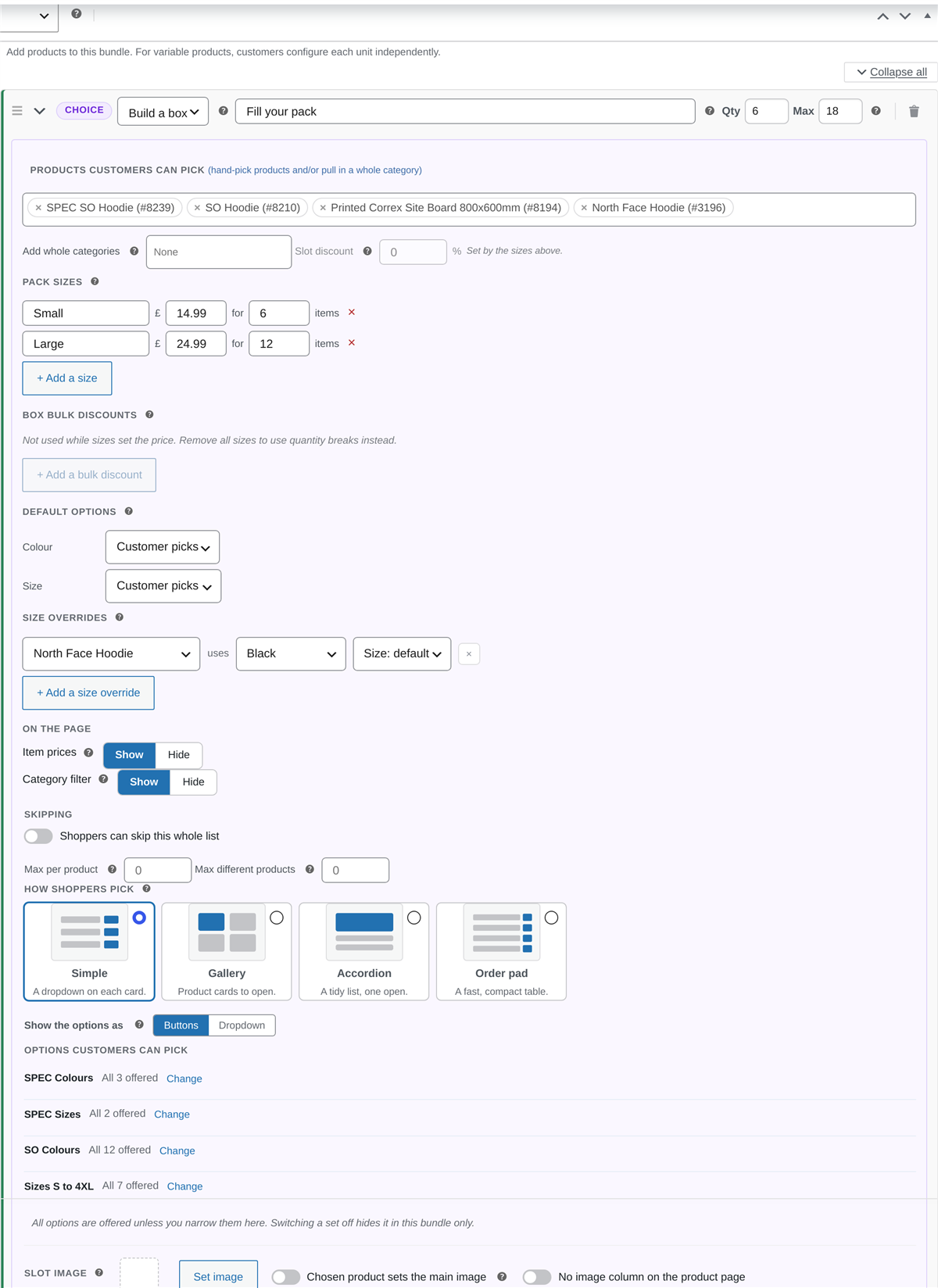
- Create a bundle and add a "Build a box" choice. Add a new Bundle product, then add a choice set and switch its mode to "Build a box". This is the pool your customer fills, rather than a fixed list you decide.
- Choose what customers can pick from. Hand-pick the products for the box, or pull in a whole category so the pool stays current as you add stock. Mix both if you like.
- Set the box size and limits. Give it a target count (say, pick 6, up to 18), or offer priced size tiers such as a small box of 6 for £14.99 and a large of 12 for £24.99. Cap how many of any one product a customer can add so the box stays balanced.
- Pick the layout and the price. Choose how shoppers pick, from simple dropdowns to a gallery, an accordion or a fast order pad, and set the price: a percentage off, a fixed box price, or bigger-box-bigger-saving tiers.
- Publish. Your customer fills the box with a live count and a running total, then buys the lot as one order that reduces the stock of each product inside it.
Common questions
Can WooCommerce do a build-a-box without a plugin?
No. Core WooCommerce has no way to let a customer pick a set number of products into one box and buy them as a single item. You need a bundle or mix-and-match plugin. BundleBoss does it, and the fixed-bundle basics are free.
What is the difference between a build-a-box and a normal bundle?
A normal bundle is a fixed set you decide. A build-a-box is a pool with a target size, where the customer chooses which products go in, up to the count and limits you set. Think "pick any 6 chocolates" or "any 4 candles".
Can I charge more for a bigger box?
Yes. You can set priced size tiers (a small box for one price, a large for another), or use bigger-box-bigger-saving quantity discounts so the per-item price falls as the box grows.
Does the stock of each product still go down?
Yes. A build-a-box order reduces the stock of every product a customer put in it, and restores it on a refund, so you never oversell.
Want the detail, with every option in pictures? See the build-a-box documentation, or compare BundleBoss to the Woo bundle stack.